
Buying Guide
6 Best USB-C to 2.5GbE Ethernet Adapters Under $50 in 2026
We compared USB-C to 2.5GbE ethernet adapters under $50 by charging wattage, device compatibility, and warranty terms, not just the 2.5Gbps speed claim.
By Jamie Cole, Lead Product Researcher
10 min read6 products evaluated
We may earn a commission from purchases made through links in this guide. Learn more.
Stretching the budget to $50 mostly buys one thing that the under-$30 tier can't: real power delivery passthrough at a wattage that covers larger laptops, plus a couple of picks backed by a proper multi-year brand warranty instead of a standard return window.
The chipset story stays the same as the cheaper tier, Realtek's RTL8156BG still powers most of this lineup, so the real comparison points at this budget are charging wattage, confirmed device compatibility lists, and how much warranty backing you're getting for the extra dollars.
Quick Picks
Our 6 recommendations at a glance. Tap a pick for the full verdict.

Best Budget Pick
Plugable 2.5Gbps USB C to Ethernet Adapter
buyers who don't need charging passthrough and want the lowest price for genuine 2.5GbE speed
Our take Check price for Plugable 2.5Gbps USB C to Ethernet Adapter (opens in a new tab)

Best for Apple Devices
UGREEN USB C to Ethernet Adapter 2.5G
Buyers running a mixed Apple setup who want confirmed tablet and phone compatibility
Our take Check price for UGREEN USB C to Ethernet Adapter 2.5G (opens in a new tab)

Best with Charging Passthrough
Plugable USB C to Ethernet Adapter 2.5Gb with 100W PD
Buyers with a 13-14" laptop who want to combine charging and ethernet into one cable
Our take Check price for Plugable USB C to Ethernet Adapter 2.5Gb with 100W PD (opens in a new tab)
Best High-Wattage Charging
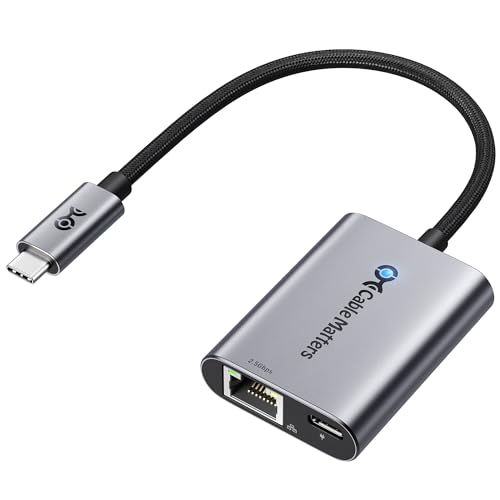
Cable Matters USB C to 2.5Gb Ethernet Adapter with 140W Charging
16" MacBook Pro or high-wattage laptop owners who need full-speed charging through the ethernet cable
Our take Check price for Cable Matters USB C to 2.5Gb Ethernet Adapter with 140W Charging (opens in a new tab)

Best Warranty
Satechi USB-C to Ethernet Adapter, 2.5 Gbps Speed
Buyers who want the longest stated warranty here and don't need charging passthrough
Our take Check price for Satechi USB-C to Ethernet Adapter, 2.5 Gbps Speed (opens in a new tab)

Best Multi-Port Pick
Satechi 4-in-1 USB-C Ethernet Adapter, 2.5 Gbps Speed
Buyers who want ethernet and extra USB-C ports combined into one adapter for a single-port laptop
Our take Check price for Satechi 4-in-1 USB-C Ethernet Adapter, 2.5 Gbps Speed (opens in a new tab)
Our Picks
Best Budget Pick1 of 6
Plugable 2.5Gbps USB C to Ethernet Adapter on Amazon (opens in a new tab)
5GbE speed here, and it's the only pick in this comparison with both a USB-A and USB-C connector built in rather than USB-C only.
Best for
- buyers who don't need charging passthrough and want the lowest price for genuine 2.5GbE speed
Why we like it
Against the charging-capable picks further down this list, the gap is simple: no power delivery passthrough. If you don't need to charge through the same cable, that omission costs you nothing functionally.
Best for buyers who don't need PD charging and want to spend the difference elsewhere, since the underlying Realtek chipset performs the same as pricier options here.
Key dimensions & specs
- Realtek RTL8156BG chipset
- USB-An and USB-C dual connector
- Aluminum housing, braided cable
Pros
- Works with both USB-An and USB-C ports
- Cheapest 2.5GbE pick in this comparison
- Aluminum shell stays cool under load
Cons
- No power delivery passthrough
- No stated multi-year warranty
Best for Apple Devices2 of 6
UGREEN USB C to Ethernet Adapter 2.5G on Amazon (opens in a new tab)
UGREEN names a specific device list that goes further than most listings: MacBook Pro/Air, Dell XPS, iPad Pro/Air, Mac Mini, and current iPhone Pro models by name, which matters if this adapter is going to double up between a laptop and a tablet on the same desk.
Best for
- Buyers running a mixed Apple setup who want confirmed tablet and phone compatibility
Why we like it
Against the Plugable pick above, the chipset and rated speed are the same, so the difference comes down to confirmed device compatibility and the status LED UGREEN adds for a quick connection check.
Best for a household or desk mixing MacBooks, iPads, and iPhones that wants one adapter confirmed across all three rather than a generic USB-C compatibility claim.
Key dimensions & specs
- Realtek RTL8156BG chipset
- Confirmed iPad and iPhone compatibility
- Status indicator lights, aluminum housing
Pros
- Explicitly lists iPhone and iPad compatibility
- Indicator lights show connection status
- Aluminum shell matches Apple device aesthetics
Cons
- USB-C only, no USB-An option
- No power delivery passthrough
Best with Charging Passthrough3 of 6
Plugable USB C to Ethernet Adapter 2.5Gb with 100W PD on Amazon (opens in a new tab)
5Gbps ethernet connection, so a single cable can charge a laptop and carry network traffic at once.
Best for
- Buyers with a 13-14" laptop who want to combine charging and ethernet into one cable
Why we like it
Compared to the higher-wattage Cable Matters pick below, 100W covers most 13-14 inch laptops and MacBooks, but a 16 inch MacBook Pro's included charger typically exceeds that, so it won't necessarily fast-charge a larger machine at full speed.
Best for anyone with a standard 13-14 inch laptop who wants to cut one cable from their desk without paying for headroom a smaller laptop doesn't need.
Key dimensions & specs
- 100W USB-C Power Delivery passthrough
- Realtek chipset, 2.5Gbps rated
- MacWorld-recognized budget pick
Pros
- Charges your laptop and carries ethernet on one cable
- 100W covers most 13-14" laptops and MacBooks
- Independently recognized by MacWorld, not just a marketing claim
Cons
- 100W may not fully fast-charge larger 16" laptops
- No stated multi-year warranty
Best High-Wattage Charging4 of 6
Cable Matters USB C to 2.5Gb Ethernet Adapter with 140W Charging on Amazon (opens in a new tab)
Cable Matters pushes the PD passthrough wattage up to 140W, specifically calling out compatibility with a 16 inch MacBook Pro's charging needs, a wattage the Plugable PD pick above can't match.
Best for
- 16" MacBook Pro or high-wattage laptop owners who need full-speed charging through the ethernet cable
Why we like it
That's the real reason to pay the extra $5.
Against that Plugable pick, both use a similar Realtek-based design with braided cable and aluminum housing, but Cable Matters explicitly documents Linux and ChromeOS driver behavior, noting older kernels may need a manual Realtek driver install, a detail the Plugable listing doesn't address.
Best for 16 inch MacBook Pro or similarly high-wattage laptop owners who specifically need full-speed charging through the same cable as their ethernet connection.
Key dimensions & specs
- 140W USB-C Power Delivery passthrough
- Realtek chipset, aluminum housing
- Documented Linux/ChromeOS driver notes
Pros
- 140W covers even 16" MacBook Pro charging needs
- Documented Linux and ChromeOS driver behavior
- Braided cable resists fraying with daily use
Cons
- Priciest single-port pick in this tier
- Older Linux kernels may need a manual driver install
Best Warranty5 of 6
Satechi USB-C to Ethernet Adapter, 2.5 Gbps Speed on Amazon (opens in a new tab)
Satechi backs this adapter with a 2-year limited warranty, longer than any stated warranty term elsewhere in this comparison, and names an unusually specific device list down to exact iPad and MacBook generations, current through 2025 M-series models.
Best for
- Buyers who want the longest stated warranty here and don't need charging passthrough
Why we like it
Against the Cable Matters and Plugable PD picks, Satechi skips power delivery entirely in exchange for that longer warranty and Ethernet pass-through capability on PCs, a feature aimed at users who want to bridge a wired connection to a second device.
Best for buyers who specifically value a documented 2-year warranty and Ethernet pass-through over charging capability, particularly in an all-Apple device household.
Key dimensions & specs
- 2-year limited warranty
- Ethernet pass-through on PCs
- Downward compatible with 1Gb devices
Pros
- 2-year warranty, longest stated term here
- Very specific, current Apple device compatibility list
- Includes Ethernet pass-through capability on PCs
Cons
- No power delivery passthrough
- Costlier than the Plugable PD pick without adding charging
Best Multi-Port Pick6 of 6
Satechi 4-in-1 USB-C Ethernet Adapter, 2.5 Gbps Speed on Amazon (opens in a new tab)
5Gbps ethernet connection, turning a single adapter into a small hub rather than just an ethernet dongle.
Best for
- Buyers who want ethernet and extra USB-C ports combined into one adapter for a single-port laptop
Why we like it
Against the standalone Satechi pick above, you're paying $5 more for those three extra ports and the same 2-year warranty, at the cost of a slightly bulkier travel footprint with a braided cable and reinforced neck built for repeated packing.
Best for buyers who want to add wired ethernet and extra USB-C ports to a single-port laptop in one purchase, rather than carrying a separate hub and ethernet adapter.
Key dimensions & specs
- 3x USB-C Gen 2 ports (up to 10Gbps)
- 2-year limited warranty
- Braided cable, reinforced neck
Pros
- Adds 3 extra USB-C ports, not just ethernet
- Same 2-year warranty as the standalone Satechi pick
- Chamfered, travel-friendly build with braided cable
Cons
- Priciest pick in this comparison
- No power delivery passthrough
How We Chose
Each pick was assessed across 5 criteria weighted for real-world use.
- For every PD-capable pick, we checked the stated wattage against common laptop charging needs (100W covers most ultrabooks, 140W covers larger MacBook Pros) rather than assuming any PD-rated port charges every laptop equally.
- At this higher price tier, we specifically noted which listings state a multi-year warranty term versus relying on a standard return window, since that's a real value difference at nearly the same price point.
- We favored listings naming exact device generations (specific MacBook or iPad models) over vague "universal compatibility" claims, since a named list is checkable against your own hardware.
- We confirmed the underlying chipset (Realtek RTL8156BG across most of this lineup) and noted any documented Linux or ChromeOS driver behavior rather than assuming parity across listings.
- Every pick had to be in stock and priced at or under $50 on the date this guide was checked; adapters that only hit this tier during a temporary sale were excluded.
What to Look for in a USB-C to 2.5GbE Ethernet Adapters Under $50
Key buying criteria so you get the right fit the first time.
Match power delivery wattage to your laptop's actual charger
A USB-C Power Delivery passthrough port lets one cable both charge your laptop and carry the ethernet connection, but the wattage rating determines whether it can actually fast-charge your specific laptop. A 100W-rated adapter covers most 13-14 inch laptops and standard MacBooks, but a 16 inch MacBook Pro or a power-hungry gaming laptop ships with a charger rated well above that, meaning a 100W passthrough charges it more slowly than its included charger would. Check the wattage printed on your laptop's own charger brick, then compare it against the adapter's stated PD wattage before assuming any PD-rated adapter fully replaces your charger.
Weigh a stated multi-year warranty against a lower price
Some adapters in this price range come from brands that explicitly state a 2-year limited warranty covering defects in materials and workmanship, while others rely on the standard return window without extending any additional coverage. At $30-45, that warranty term becomes a real part of the value calculation, since a failure eighteen months in costs you the full price again with no coverage on a warranty-less pick. Check the listing's "What You Get" section or product description for an explicit warranty length rather than assuming any adapter at this price includes one.
Check whether device compatibility is named specifically or claimed generically
A listing that names exact device generations, specific MacBook Pro or iPad Pro models by year and chip, gives you something checkable against your own hardware, while a listing that only claims "universal compatibility" leaves you guessing whether it's actually been tested on your specific device. This especially matters for iPad and iPhone use, since not every USB-C ethernet adapter has been confirmed to work with Apple's mobile devices even when it works fine with a MacBook. Look for your exact device model named in the bullet points, not just a general product-category claim.
Decide if extra USB-C ports are worth paying more for
A small number of adapters at this price combine the ethernet connection with two or three extra USB-C data ports, functioning as a mini hub rather than a single-purpose dongle. This is worth paying extra for specifically if your laptop has only one USB-C port total and you regularly need to connect a drive or another peripheral at the same time as ethernet. If your laptop already has multiple USB-C ports, a single-purpose ethernet adapter covers the same networking need for less money without the added bulk.
Confirm the OS driver situation before assuming plug-and-play
5G Ethernet Controller driver installed manually rather than working immediately out of the box. If you're running Linux or ChromeOS as your primary system, prioritize a listing that documents this driver behavior directly rather than one that only claims broad, unspecified compatibility.
How to Choose a USB-C to 2.5GbE Ethernet Adapters Under $50
| The lowest price with no compromises on speed | 5Gbps USB C to Ethernet Adapter |
|---|---|
| Charging passthrough for a standard laptop | Plugable USB C to Ethernet Adapter with 100W PD |
| Charging passthrough for a 16" MacBook Pro | 5Gb Ethernet Adapter with 140W Charging |
| Extra USB-C ports alongside ethernet | Satechi 4-in-1 USB-C Ethernet Adapter |
100W vs 140W Power Delivery
- Covers most 13-14 inch laptops and standard MacBooks at full charging speed, at a lower price than the 140W option.
- Matches the charging needs of a 16 inch MacBook Pro or similar high-wattage laptop that a 100W adapter would charge more slowly.
Check your laptop's included charger's wattage rating before choosing: if it's rated under 100W, the cheaper Plugable PD pick covers you fully.
| Satechi USB-C to Ethernet Adapter (2-year) | |
| No stated warranty beyond standard return window | Plugable, UGREEN, or Cable Matters |
For a Single-Port Laptop Specifically
- An adapter that adds extra USB-C ports alongside ethernet, not just a single-purpose ethernet dongle, if your laptop only has one USB-C port total.
- The Satechi 4-in-1 is the only pick here that adds three extra USB-C ports on top of the ethernet connection.
- 00) is the only pick here that matches that charging need.
- 99) uses the same core chipset as every pricier pick here.
Frequently Asked Questions
Is 100W or 140W power delivery the right choice for my laptop?
Check the wattage printed on your laptop's own charger brick. If it's rated 100W or under, a 100W passthrough adapter fully covers your charging needs. If your charger is rated higher, common on 16-inch MacBook Pros and some gaming laptops, a 140W adapter is needed to match full charging speed.
Does a longer warranty actually matter for a $30-45 adapter?
It can, since these are low-cost electronics that occasionally fail after normal daily plugging and unplugging. A 2-year warranty means a failure well into ownership is still covered, while a pick with no stated warranty term relies only on the standard short return window most retailers offer.
Can I use one of these adapters with both my MacBook and my iPad?
Some can, but check the specific listing rather than assuming. A few adapters in this comparison explicitly name iPad Pro and iPad Air compatibility alongside MacBooks, while others only confirm laptop compatibility and don't mention tablets at all.
Why would I pay more for a multi-port adapter instead of a plain ethernet dongle?
It's worth it if your laptop has only one USB-C port and you regularly need both a wired network connection and another USB-C accessory at the same time. If your laptop has multiple USB-C ports already, a single-purpose ethernet adapter meets the same networking need for less money.
Will these adapters slow down if I'm also charging my laptop through them?
The ethernet connection and the power delivery passthrough run on separate circuitry inside the adapter, so charging shouldn't meaningfully affect the network speed. 5GbE in the first place, not whether the adapter is also charging your laptop.
Do I need to install drivers for these adapters on a Chromebook?
Most work without a manual driver install on ChromeOS, but at least one listing in this comparison specifically documents ChromeOS compatibility while others don't mention it at all. If you're on ChromeOS specifically, prioritize a listing that names ChromeOS support directly rather than assuming it based on general USB-C compatibility.
Bottom Line
Best overall: Plugable 2.5Gbps USB C to Ethernet Adapter — best budget pick pick in this roundup. See the full verdicts above for every pick, with pros, cons and who each one suits.
Browse all usb-c to 2.5gbe ethernet adapters under $50 on Amazon — Prime-eligible options with current pricing.