
Buying Guide
The Best USB-C Multiport Adapters With Ethernet: Picks and Trade-offs
We looked at 7 USB-C multiport adapters with ethernet side by side, with the trade-offs that separate them and who each one suits.
By Jamie Cole, Lead Product Researcher
10 min read7 products evaluated
We may earn a commission from purchases made through links in this guide. Learn more.
This is a hub category, not a pure Ethernet dongle comparison: every product here shares the same host USB-C connection between Ethernet, HDMI video, PD charging, and USB data ports, so what happens when several are used at once matters as much as any single port's spec.
We compared HDMI refresh rate (a real differentiator ranging from 30Hz to 60Hz to 120Hz on gaming-focused docks), passthrough charging wattage, and whether the Ethernet port itself is Gigabit or, in one budget model, capped at just 100Mbps.
Quick Picks
Our 7 recommendations at a glance. Tap a pick for the full verdict.

Best Overall (6-in-1, 4K@30Hz)
UGREEN Revodok 6-in-1 USB-C Hub
Buyers prioritizing 6-in-1: 4k@30hz hdmi, gigabit ethernet, 100w pd, 3x usb-a
Our take Check price for UGREEN Revodok 6-in-1 USB-C Hub (opens in a new tab)

Best 4K@60Hz Budget Pick
Acer 6-in-1 USB-C Hub with Ethernet
Buyers prioritizing 6-in-1: 4k@60hz hdmi, gigabit ethernet, 100w pd, 2x usb-a, usb-c
Our take Check price for Acer 6-in-1 USB-C Hub with Ethernet (opens in a new tab)

Best Anker 6-in-1
Anker 6-in-1 USB-C Hub with Ethernet
Buyers prioritizing 6-in-1: pd, hdmi 4k@30hz, ethernet, usb-c, 2x usb-a
Our take Check price for Anker 6-in-1 USB-C Hub with Ethernet (opens in a new tab)
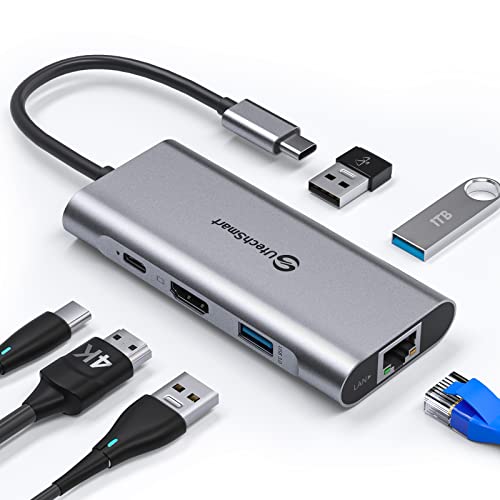
Best with Steam Deck Charging
UtechSmart 6-in-1 USB-C Hub
buyers prioritizing 6-in-1: 1000m ethernet, 4k hdmi, 3x usb 3.0, 100w pd
Our take Check price for UtechSmart 6-in-1 USB-C Hub (opens in a new tab)

Best 8-in-1 with SD/TF Reader
ABLEWE USB-C Hub Ethernet 8-in-1
Buyers prioritizing 8-in-1: 4k@60hz hdmi, gigabit ethernet, 100w pd, 3x usb-a, sd/tf
Our take Check price for ABLEWE USB-C Hub Ethernet 8-in-1 (opens in a new tab)

Budget Pick
8-in-1 USB-C Hub (Generic, RJ45 100Mbps)
Buyers prioritizing 8-in-1: 4k@30hz hdmi, 100mbps ethernet, 100w pd, 2x usb-a, tf/sd
Our take Check price for 8-in-1 USB-C Hub (Generic, RJ45 100Mbps) (opens in a new tab)

Best Dual USB-A/USB-C
Acer USB to Ethernet Adapter (Dual USB-A/C)
buyers prioritizing gigabit ethernet + 3x usb-a 3.0 (shared 5gbps)
Our take Check price for Acer USB to Ethernet Adapter (Dual USB-A/C) (opens in a new tab)
| Pick | Best for | Key spec | Price |
|---|---|---|---|
| Buyers prioritizing 6-in-1: 4k@30hz hdmi, gigabit ethernet, 100w pd, 3x usb-a | 6-in-1: 4K@30Hz HDMI, Gigabit Ethernet, 100W PD, 3x USB-A | Check price for UGREEN Revodok 6-in-1 USB-C Hub (opens in a new tab) |
| Buyers prioritizing 6-in-1: 4k@60hz hdmi, gigabit ethernet, 100w pd, 2x usb-a, usb-c | 6-in-1: 4K@60Hz HDMI, Gigabit Ethernet, 100W PD, 2x USB-A, USB-C | Check price for Acer 6-in-1 USB-C Hub with Ethernet (opens in a new tab) |
| Buyers prioritizing 6-in-1: pd, hdmi 4k@30hz, ethernet, usb-c, 2x usb-a | 6-in-1: PD, HDMI 4K@30Hz, Ethernet, USB-C, 2x USB-A | Check price for Anker 6-in-1 USB-C Hub with Ethernet (opens in a new tab) |
| buyers prioritizing 6-in-1: 1000m ethernet, 4k hdmi, 3x usb 3.0, 100w pd | 6-in-1: 1000M Ethernet, 4K HDMI, 3x USB 3.0, 100W PD | Check price for UtechSmart 6-in-1 USB-C Hub (opens in a new tab) |
| Buyers prioritizing 8-in-1: 4k@60hz hdmi, gigabit ethernet, 100w pd, 3x usb-a, sd/tf | 8-in-1: 4K@60Hz HDMI, Gigabit Ethernet, 100W PD, 3x USB-A, SD/TF | Check price for ABLEWE USB-C Hub Ethernet 8-in-1 (opens in a new tab) |
| Buyers prioritizing 8-in-1: 4k@30hz hdmi, 100mbps ethernet, 100w pd, 2x usb-a, tf/sd | 8-in-1: 4K@30Hz HDMI, 100Mbps Ethernet, 100W PD, 2x USB-A, TF/SD | Check price for 8-in-1 USB-C Hub (Generic, RJ45 100Mbps) (opens in a new tab) |
| buyers prioritizing gigabit ethernet + 3x usb-a 3.0 (shared 5gbps) | Gigabit Ethernet + 3x USB-A 3.0 (shared 5Gbps) | Check price for Acer USB to Ethernet Adapter (Dual USB-A/C) (opens in a new tab) |
Our Picks
Best Overall (6-in-1, 4K@30Hz)1 of 7
UGREEN Revodok 6-in-1 USB-C Hub on Amazon (opens in a new tab)
0 ports at up to 5Gbps.
Best for
- Buyers prioritizing 6-in-1: 4k@30hz hdmi, gigabit ethernet, 100w pd, 3x usb-a
Why we like it
UGREEN notes 15W of the 100W input is reserved for hub operation, and the USB-C port itself only supports charging, not data or video. A multi-function hub rather than a single-purpose dongle.
85W passthrough charging keeps the laptop powered.
Key dimensions & specs
- 6-in-1: 4K@30Hz HDMI, Gigabit Ethernet, 100W PD, 3x USB-A
- 85W passthrough to host laptop
- 5Gbps USB-A data transfer
Pros
- Combines Ethernet with HDMI, charging, and three USB-A ports in one hub
- 85W passthrough charging keeps the laptop powered
- 5Gbps USB-A ports for fast peripheral transfers
- Reduces desk clutter versus separate single-purpose dongles
Cons
- HDMI capped at 4K@30Hz, not 60Hz
- USB-C port itself is charging-only, no data or video passthrough
Best 4K@60Hz Budget Pick2 of 7
Acer 6-in-1 USB-C Hub with Ethernet on Amazon (opens in a new tab)
1 Gen1 data port, all usable simultaneously.
Best for
- Buyers prioritizing 6-in-1: 4k@60hz hdmi, gigabit ethernet, 100w pd, 2x usb-a, usb-c
Why we like it
0+, and the Gigabit port needs CAT6+ cable for full 1000Mbps. Data ports support transfer only, not charging.
Key dimensions & specs
- 6-in-1: 4K@60Hz HDMI, Gigabit Ethernet, 100W PD, 2x USB-A, USB-C
- 5Gbps total data bandwidth
- Requires DP 1.4 Alt Mode for 4K@60Hz
Pros
- 4K@60Hz HDMI at a lower price than several competing hubs
- All 6 ports usable simultaneously per Acer's spec
- 100W PD input with up to 85W passthrough to the host
- Genuine Acer brand accessory
Cons
- 4K@60Hz requires host support for DP 1.4 Alt Mode and HDMI 2.0+
- Data ports are transfer-only, no charging capability
Best Anker 6-in-13 of 7
Anker 6-in-1 USB-C Hub with Ethernet on Amazon (opens in a new tab)
Combines a PD charging input, HDMI (up to 4K@30Hz), Ethernet port, a USB-C data port, and 2 USB-A ports in one hub, letting a 65W wall charger pass through power to the connected laptop.
Best for
- Buyers prioritizing 6-in-1: pd, hdmi 4k@30hz, ethernet, usb-c, 2x usb-a
Why we like it
A genuine multiport solution rather than a single-purpose dongle, useful when you need display output and extra USB ports alongside wired networking from one device.
Pass-through charging keeps the laptop powered while docked.
Key dimensions & specs
- 6-in-1: PD, HDMI 4K@30Hz, Ethernet, USB-C, 2x USB-A
- Pass-through charging via 65W input
- 18-month warranty
Pros
- Combines Ethernet with HDMI display output and extra USB ports
- Pass-through charging keeps the laptop powered while docked
- 18-month Anker warranty and support
- Reduces cable clutter versus separate dongles
Cons
- 4K output capped at 30Hz, not 60Hz
- Bulkier than a single-purpose Ethernet dongle
Best with Steam Deck Charging4 of 7
UtechSmart 6-in-1 USB-C Hub on Amazon (opens in a new tab)
0 ports at up to 5Gbps, and 100W PD charging, with advanced heat dissipation for stable connections.
Best for
- buyers prioritizing 6-in-1: 1000m ethernet, 4k hdmi, 3x usb 3.0, 100w pd
Why we like it
UtechSmart explicitly lists Steam Deck compatibility for charging alongside standard Windows/Mac/ChromeOS support, backed by an 18-month warranty and 24/7 customer service.
Lower price point than several comparable 6-in-1 hubs.
Key dimensions & specs
- 6-in-1: 1000M Ethernet, 4K HDMI, 3x USB 3.0, 100W PD
- Steam Deck charging compatible
- 18-month warranty
Pros
- Explicit Steam Deck charging compatibility
- Lower price point than several comparable 6-in-1 hubs
- Advanced heat dissipation for stable connections
- 18-month warranty with 24/7 support
Cons
- No specified HDMI refresh rate ceiling published beyond "4K"
- Universal compatibility claim is less detailed than competitors' explicit device lists
Best 8-in-1 with SD/TF Reader5 of 7
ABLEWE USB-C Hub Ethernet 8-in-1 on Amazon (opens in a new tab)
0 ports, and SD/TF card slots in one compact hub.
Best for
- Buyers prioritizing 8-in-1: 4k@60hz hdmi, gigabit ethernet, 100w pd, 3x usb-a, sd/tf
Why we like it
A low-cost full-featured hub at a notably low price.
Key dimensions & specs
- 8-in-1: 4K@60Hz HDMI, Gigabit Ethernet, 100W PD, 3x USB-A, SD/TF
- 85W max passthrough after hub consumption
- Requires DP 1.4 for 4K@60Hz
Pros
- Lowest price among full-featured 8-in-1 hubs in this cluster
- 4K@60Hz HDMI output with proper DP 1.4 support
- SD/TF card reader for content workflows
- 3x USB-A ports at up to 5Gbps
Cons
- Requires DP Alt Mode host support for any HDMI output at all
- PD port supports charging only, not data or video
Budget Pick6 of 7
8-in-1 USB-C Hub (Generic, RJ45 100Mbps) on Amazon (opens in a new tab)
An 8-port hub adding 4K HDMI (up to 30Hz), a 100Mbps RJ45 Ethernet port, 100W PD charging, 2x USB-A, and a TF/SD card reader, notably the only hub in this cluster with an Ethernet port capped at 100Mbps rather than Gigabit.
Best for
- Buyers prioritizing 8-in-1: 4k@30hz hdmi, 100mbps ethernet, 100w pd, 2x usb-a, tf/sd
Why we like it
The listing explicitly notes USB-C devices need DP Alt mode for video transfer, and the PD port doesn't support data transfer. The lowest price hub in this comparison.
Aluminum housing for durability and heat dissipation.
Key dimensions & specs
- 8-in-1: 4K@30Hz HDMI, 100Mbps Ethernet, 100W PD, 2x USB-A, TF/SD
- Ethernet capped at 100Mbps, not Gigabit
- Lowest price hub in this cluster
Pros
- Lowest price of any multiport hub compared here
- Aluminum housing for durability and heat dissipation
- SD/TF card reader reads up to 1TB cards
- 100W PD charging support
Cons
- Ethernet port capped at 100Mbps, a real step down from every Gigabit competitor
- 4K HDMI limited to 30Hz, not 60Hz
Best Dual USB-A/USB-C7 of 7
Acer USB to Ethernet Adapter (Dual USB-A/C) on Amazon (opens in a new tab)
0 ports at a shared 5Gbps bandwidth, all usable simultaneously.
Best for
- buyers prioritizing gigabit ethernet + 3x usb-a 3.0 (shared 5gbps)
Why we like it
0 chip, and provides an installation manual for manual driver download if needed.
Key dimensions & specs
- Gigabit Ethernet + 3x USB-A 3.0 (shared 5Gbps)
- Dual USB-A/USB-C connector design
- No HDMI, no PD charging
Pros
- Works with both USB-An and USB-C hosts from one adapter
- Three simultaneous USB-A ports for peripherals
- Aluminum alloy build for durability and heat dissipation
- Genuine Acer brand accessory at a reasonable price
Cons
- No HDMI or PD charging, network- and USB-only
- Three USB-A ports share a single 5Gbps bandwidth pool
How We Chose These USB-C Multiport Adapters With Ethernet
Each pick was assessed across 5 criteria weighted for real-world use.
- 5G/5G/10G) and, where published, the specific Realtek, Marvell, or other controller chip driving it, rather than assuming USB-C connector shape implies a speed tier.
- 2 Gen 2 vs Thunderbolt/USB4) and confirmed OS support, since several products in this cluster have real exclusions (Android, Nintendo Switch, older Apple silicon).
- Favored listings that publish honest real-world throughput or explicit host-speed caveats over ones that only quote the theoretical link rate.
- Weighed braided cable construction, aluminum housing, and reinforced connectors, since these adapters see frequent plug/unplug cycles in daily use.
- Prioritized real differences like Wake-on-LAN, PXE boot, PD passthrough wattage, and multiport expansion over marketing language that repeats across nearly identical adapters.
What to Look for in a USB-C Multiport Adapter With Ethernet
Key buying criteria so you get the right fit the first time.
Match actual size and capacity to your real need, not the category label alone
Listings for a usb-c multiport adapters with ethernet often use a size or capacity label ("compact," "large," "heavy-duty") that isn't standardized across brands, so the same label can mean meaningfully different actual dimensions or capacity from one product to the next.
This matters because buying based on the category label rather than the specific listed dimensions or capacity is a common way to end up with something that doesn't actually fit your space or handle your real load.
Check the listing for exact measurements or a stated capacity figure, and compare that directly against your actual space or need, not just the marketing size category.
Verify build material and construction quality from reviews, not just spec-sheet claims
A product description can describe material or construction in flattering terms that don't always hold up under real, sustained use, and the gap between a listing's claimed quality and its actual durability only shows up in how the product performs after weeks or months of real use, not in day-one photos.
This matters more for anything you'll use daily or under real load, less for occasional light use where durability matters less.
Check reviews specifically for mentions of how the usb-c multiport adapters with ethernet holds up over time, not just unboxing-day impressions, and treat a listing's own quality claims as a starting point to verify, not a guarantee.
Confirm any headline feature actually works as advertised, not just that it's listed
A feature appearing in a product's bullet points doesn't guarantee it performs well in practice, some features are functional but limited, and a few are closer to a marketing checkbox than a useful capability.
This matters directly if a specific feature is the main reason you're choosing this usb-c multiport adapters with ethernet over a simpler, cheaper alternative, since a feature that underperforms in practice undermines the whole reason for paying more.
Check reviews specifically for real-world experiences with the exact feature that matters most to you, not just whether the feature is listed at all.
Weigh review count alongside rating, not rating alone
This matters more for a purchase you're relying on to perform consistently over time, less for a low-stakes, easily replaceable item.
Check both the star rating and the review count together for any usb-c multiport adapters with ethernet you're considering, and treat a high rating on a very small review count as a promising but less-proven signal.
Check compatibility and fit with your existing setup before ordering
A usb-c multiport adapters with ethernet that looks like a straightforward fit in photos can still have a compatibility detail, a connector type, a mounting requirement, a size threshold, that doesn't match your existing setup, and this kind of mismatch is one of the most common and avoidable reasons for a return.
This matters directly if the product needs to physically connect to, mount on, or otherwise integrate with something you already own.
Check the listing's specific compatibility details against your exact existing setup, not just the general product category, before ordering.
How to Choose a USB-C Multiport Adapter With Ethernet
By Rating Confidence: Highest Rated vs Most Reviewed
- The lower-priced option in this comparison, worth checking its actual specs and review history against your specific need before assuming it's enough.
- The higher-priced option, worth it if it offers real, checkable headroom in build quality, capacity, or features over the cheaper pick.
Default to 8 unless your specific need calls for the pricier pick's extra headroom.
For a First-Time Buyer Specifically
- Clear, specific dimensions or capacity and a real, established review history, not just marketing language.
- You need real durability and feature depth for regular use, where Anker 6's build gives real headroom over the cheaper picks.
- You only need this for light or occasional use, where 8 covers the same job at a lower price.
Frequently Asked Questions
Do all these hubs' ports work at full speed simultaneously?
Manufacturers generally claim simultaneous operation, but shared USB bandwidth means heavy use of multiple high-speed ports at once (video output plus fast data transfer) can bottleneck each other in practice. Check each specific hub's documented bandwidth allocation for demanding multi-port workflows.
Why does one hub have a 100Mbps Ethernet port instead of Gigabit?
It's a genuine cost-cutting measure on that specific budget model. Every other hub in this comparison includes full Gigabit Ethernet; only the lowest-priced 8-in-1 hub caps at 100Mbps, so check this spec carefully if wired speed matters to you.
Bottom Line
Best overall: UGREEN Revodok 6-in-1 USB-C Hub — best overall (6-in-1, 4k@30hz) pick in this roundup. See the full verdicts above for every pick, with pros, cons and who each one suits.
Browse all usb-c multiport adapters with ethernet on Amazon — Prime-eligible options with current pricing.