
Buying Guide
The Best USB-C Ethernet Adapters for Linux, Compared
We looked at 6 USB-C ethernet adapters for linux side by side, with the trade-offs that separate them and who each one suits.
By Jamie Cole, Lead Product Researcher
8 min read6 products evaluated
We may earn a commission from purchases made through links in this guide. Learn more.
Linux Ethernet adapter compatibility comes down to the specific controller chip and whether your kernel has an in-tree driver for it, and several adapters in this cluster are refreshingly specific about exact kernel version requirements rather than a vague "Linux compatible" claim.
We ranked by documented chipset (RTL8153, RTL8156, RTL8157, RTL8159) and explicit kernel version requirements where published, since this level of detail is a genuine trust signal that a listing was written by someone who understands Linux driver support.
Quick Picks
Our 6 recommendations at a glance. Tap a pick for the full verdict.

Best Overall
Anker USB-C to Ethernet Adapter
buyers prioritizing 1gbps, usb-c 3.0
Our take Check price for Anker USB-C to Ethernet Adapter (opens in a new tab)

Best Value
uni USB-C to Ethernet Adapter 1Gbps
Buyers prioritizing 1gbps, driver-free on most oses
Our take Check price for uni USB-C to Ethernet Adapter 1Gbps (opens in a new tab)

Runner-Up
UGREEN USB-C to Ethernet Adapter (1Gbps)
Buyers prioritizing 1gbps, driver-free on most oses
Our take Check price for UGREEN USB-C to Ethernet Adapter (1Gbps) (opens in a new tab)

Best 5G for Linux
Cable Matters USB-C to 5Gb Ethernet Adapter
buyers prioritizing 5000mbps ethernet, requires usb 3.2 gen 2+
Our take Check price for Cable Matters USB-C to 5Gb Ethernet Adapter (opens in a new tab)
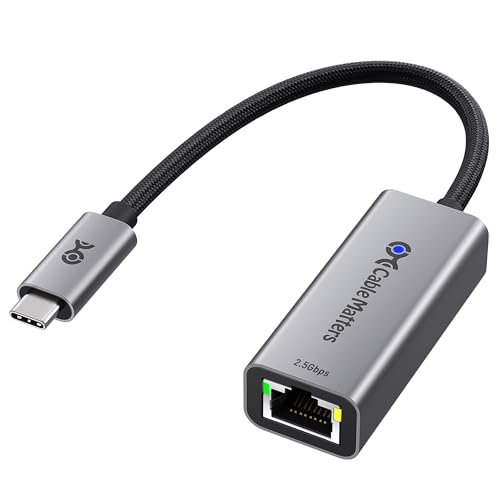
Best 2.5G for Linux
Cable Matters USB-C to 2.5Gb Ethernet Adapter
buyers prioritizing 2.5gbps ethernet
Our take Check price for Cable Matters USB-C to 2.5Gb Ethernet Adapter (opens in a new tab)

Most Compact, Driver-Free on Ubuntu
TP-Link UE300C USB-C to Ethernet Adapter
Buyers prioritizing 1gbps, driver-free including linux
Our take Check price for TP-Link UE300C USB-C to Ethernet Adapter (opens in a new tab)
Our Picks
Best Overall1 of 6
Anker USB-C to Ethernet Adapter on Amazon (opens in a new tab)
A 1Gbps USB-C to Ethernet adapter with a sleek aluminum exterior and braided nylon cable, at just over half an inch thick and roughly the weight of an AA battery.
Best for
- buyers prioritizing 1gbps, usb-c 3.0
Why we like it
Backed by Anker's 18-month warranty and customer service. 0 devices, a straightforward pick when you want a name-brand adapter without extra features.
Key dimensions & specs
- 1Gbps, USB-C 3.0
- Aluminum body + braided nylon cable
- 18-month warranty
Pros
- Aluminum exterior and braided cable for durability
- Extremely compact and lightweight design
- Backed by Anker's established warranty and support
- Simple, no-frills single-purpose adapter
Cons
- No PD charging or extra ports
- Requires CAT6+ cable to hit full 1Gbps
Best Value2 of 6
uni USB-C to Ethernet Adapter 1Gbps on Amazon (opens in a new tab)
A driver-free 1Gbps adapter with a non-slip design for easier plugging, braided nylon cable, and premium aluminum casing for heat dissipation, explicitly designed not to block adjacent USB-C ports.
Best for
- Buyers prioritizing 1gbps, driver-free on most oses
Why we like it
Lists extensive device compatibility including iPhone 15/16 Pro/Max and multiple MacBook generations, but is explicit it does NOT work with Nintendo Switch. Comes with an 18-month warranty and 24/7 customer service.
Key dimensions & specs
- 1Gbps, driver-free on most OSes
- Non-slip, port-clearing design
- 18-month warranty
Pros
- Non-slip design keeps adjacent USB-C ports accessible
- Broad device compatibility list including recent iPhones
- Aluminum casing for better heat dissipation
- 24/7 customer support with fast response claim
Cons
- Explicitly not compatible with Nintendo Switch
- Requires CAT6+ cable to reach full 1Gbps
Runner-Up3 of 6
UGREEN USB-C to Ethernet Adapter (1Gbps) on Amazon (opens in a new tab)
1/8, macOS, Chrome OS, Android need no driver; Windows XP/7/Vista and Linux need one) with an aluminum alloy case for heat dissipation and an LED status indicator.
Best for
- Buyers prioritizing 1gbps, driver-free on most oses
Why we like it
UGREEN explicitly lists compatibility with Nintendo Switch and Steam Deck alongside standard laptops and phones, a notable differentiator since several competitors in this cluster exclude Switch support.
Key dimensions & specs
- 1Gbps, driver-free on most OSes
- Aluminum alloy case, LED status light
- Nintendo Switch + Steam Deck compatible
Pros
- Explicitly compatible with both Nintendo Switch and Steam Deck
- Driver-free on the most common operating systems
- Reinforced cable tail and wear-resistant port for durability
- LED indicator shows connection status at a glance
Cons
- Not driver-free on Windows XP/7/Vista or Linux
- 1Gbps ceiling, no multi-gig option in this specific model
Best 5G for Linux4 of 6
Cable Matters USB-C to 5Gb Ethernet Adapter on Amazon (opens in a new tab)
2 Gen 2 (10Gbps) port or higher to achieve the full 5Gbps.
Best for
- buyers prioritizing 5000mbps ethernet, requires usb 3.2 gen 2+
Why we like it
Supports USB-C, USB4, Thunderbolt 5, Thunderbolt 4, and Thunderbolt 3 devices, though explicitly does not support Android. Recommends the Realtek RTL8157 driver on older Windows or certain Linux kernels.
Key dimensions & specs
- 5000Mbps Ethernet, requires USB 3.2 Gen 2+
- Aluminum housing, braided pigtail cable
- Wide Thunderbolt 3/4/5 + USB4 support
Pros
- Full plug-and-play on latest macOS and Windows
- Wide Thunderbolt generation support (3, 4, and 5)
- Aluminum housing with braided cable for durability
- Works with NAS systems, routers, and network switches directly
Cons
- Does not support Android devices
- Requires a USB 3.2 Gen 2 (10Gbps) port to reach the full 5Gbps
Best 2.5G for Linux5 of 6
Cable Matters USB-C to 2.5Gb Ethernet Adapter on Amazon (opens in a new tab)
5Gbps adapter with aluminum housing and braided pigtail cable for durability, working out of the box with plug-and-play installation on most systems.
Best for
- buyers prioritizing 2.5gbps ethernet
Why we like it
5G Ethernet Controller driver on older operating systems or certain Linux kernels for best speed, and notes it does not support Android devices.
Key dimensions & specs
- 2.5Gbps Ethernet
- Aluminum housing, braided pigtail cable
- Supports Wake-on-LAN
Pros
- Plug-and-play on most current systems without manual driver install
- Aluminum housing with braided cable for long-term durability
- Wide compatibility across Windows, macOS, Linux, ChromeOS, and IOS
- Reasonable price for a 2.5Gbps adapter from an established brand
Cons
- Does not support Android devices
- Older OS versions or certain Linux kernels need a manual driver for best speed
Most Compact, Driver-Free on Ubuntu6 of 6
TP-Link UE300C USB-C to Ethernet Adapter on Amazon (opens in a new tab)
1/8/7, macOS, Chrome OS, and Linux (Ubuntu), backed by TP-Link's status as a signatory of CISA's Secure-by-Design pledge.
Best for
- Buyers prioritizing 1gbps, driver-free including linux
Why we like it
Explicitly lists compatibility with Dell XPS 13/15, Surface Laptop 3, Google Pixelbook, Lenovo ThinkPad X1 Carbon and Yoga models. The foldable design is a genuine space-saver for a laptop bag compared to rigid competitors.
Key dimensions & specs
- 1Gbps, driver-free including Linux
- 2.8 x 1.0 x 0.6in foldable design
- CISA Secure-by-Design pledge signatory
Pros
- Foldable design is more compact than rigid competitors for travel
- Driver-free on Linux (Ubuntu), not all competitors support this out of the box
- CISA Secure-by-Design commitment is a real security signal
- Explicit ThinkPad and Surface compatibility notes
Cons
- 1Gbps ceiling only, no multi-gig variant in this listing
- No extra ports or PD charging
How We Chose These USB-C Ethernet Adapters for Linux
Each pick was assessed across 5 criteria weighted for real-world use.
- 5G/5G/10G) and, where published, the specific Realtek, Marvell, or other controller chip driving it, rather than assuming USB-C connector shape implies a speed tier.
- 2 Gen 2 vs Thunderbolt/USB4) and confirmed OS support, since several products in this cluster have real exclusions (Android, Nintendo Switch, older Apple silicon).
- Favored listings that publish honest real-world throughput or explicit host-speed caveats over ones that only quote the theoretical link rate.
- Weighed braided cable construction, aluminum housing, and reinforced connectors, since these adapters see frequent plug/unplug cycles in daily use.
- Prioritized real differences like Wake-on-LAN, PXE boot, PD passthrough wattage, and multiport expansion over marketing language that repeats across nearly identical adapters.
What to Look for in a USB-C Ethernet Adapter for Linux
Key buying criteria so you get the right fit the first time.
USB-C is a connector, not a speed
A USB-C port can carry anywhere from 1Gbps to 10Gbps of Ethernet depending on the adapter's chipset and your host's actual USB generation. Check the exact Ethernet speed and required USB mode before assuming any USB-C adapter matches your needs.
Multi-gig speeds need a fast enough USB port
0 (5Gbps) port will not reach its rated Ethernet speed. 2 Gen 2 (10Gbps) port or Thunderbolt/USB4 host.
Check OS and driver requirements before buying
Most Gigabit adapters are driver-free on Windows, macOS, and ChromeOS, but multi-gig adapters often need a manufacturer driver on Windows or specific Linux kernel versions, and some models exclude older Apple silicon chips entirely.
Confirm your specific device isn't excluded
Several adapters in this cluster explicitly do not work with Nintendo Switch, Android, or specific Mac chip generations. Read the compatibility list carefully rather than assuming a USB-C connector guarantees your device will work.
A CAT6 cable matters as much as the adapter
Even a genuine Gigabit-capable adapter will fall back to slower speeds over an old CAT5 cable. Use CAT6 or better for Gigabit, and CAT6A for 5G/10G speeds, to actually realize the adapter's rated performance.
PD passthrough wattage isn't automatically usable
An adapter rated for 100W or 140W Power Delivery passthrough only delivers that much power if you also supply a charger and cable rated for it. The adapter's rating is a ceiling, not a guarantee, without the matching charger.
How to Choose a USB-C Ethernet Adapter for Linux
| Well-supported in-kernel on most current distributions | |
| 17+ for its 5G model | |
| Newest chipset, verify current kernel support before buying |
Frequently Asked Questions
Does 'driver-free on Linux' mean the same thing across all these adapters?
It means the chipset has an in-kernel driver already included in a reasonably current Linux distribution. Older distributions or older kernels may need a manual driver install even for chipsets that are technically "in-kernel" on newer releases.
Which adapter has the most explicit Linux documentation?
TP-Link's UE300C explicitly lists Linux (Ubuntu) as driver-free in its own marketing copy, a level of specificity most competitors don't provide.
Bottom Line
Best overall: Anker USB-C to Ethernet Adapter — best overall pick in this roundup. See the full verdicts above for every pick, with pros, cons and who each one suits.
Browse all usb-c ethernet adapters for linux on Amazon — Prime-eligible options with current pricing.