
Buying Guide
The Best Ultrawide Monitor Stands: Risers and Arms Compared
By Jamie Cole, Lead Product Researcher
10 min read7 products evaluated
We may earn a commission from purchases made through links in this guide. Learn more.
"Ultrawide monitor stand" covers two different products. A riser is a platform that your monitor's own stand sits on: no VESA mount needed, usually cheaper, and often with storage underneath. An arm holds the monitor by its VESA pattern and adds height, tilt and rotation adjustment, but only works if the monitor has a VESA mount and its weight is within the arm's rating.
For ultrawides, weight and width are the constraints. A riser has to be wide and deep enough for the monitor's stand; an arm has to be rated for the panel's weight without its stand, and heavy 49-inch screens need a heavy-duty arm. Check your monitor's specifications before comparing anything else.
Our comparison is based on published specifications, including capacity, size support, adjustment and mounting method, plus price position, not hands-on testing. Prices range from about $27 to $94 at the time of writing.
Quick Picks
Our 7 recommendations at a glance. Tap a pick for the full verdict.

Best High-Capacity Riser
WESTREE Dual Monitor Stand Riser
A 35.8-inch steel-and-wood riser rated for 150 lb, with storage underneath.
Best for: Heavy ultrawides, including large ones, where a simple lift is enough.
Our take Check price for WESTREE Dual Monitor Stand Riser (opens in a new tab)

Best Adjustable-Width Riser
Across-Star Dual Monitor Stand Riser
A modular riser that adjusts from 32 to 40 inches wide, rated for 80 lb.
Best for: Desks where a riser needs to fit a specific width.
Our take Check price for Across-Star Dual Monitor Stand Riser (opens in a new tab)
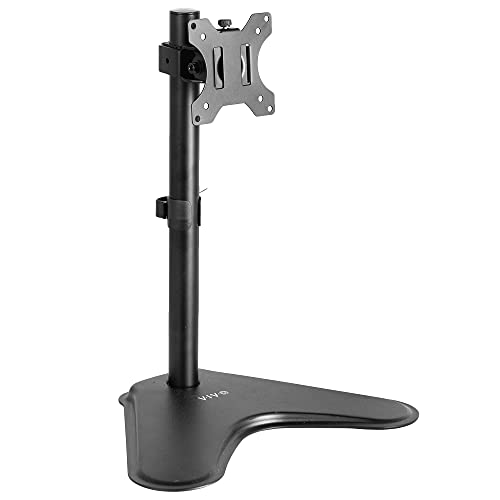
Best Freestanding Stand
VIVO Single Monitor Desk Stand (Freestanding)
A VESA stand with its own base, for monitors up to 38 inches, where clamping is not allowed.
Best for: Desks where clamping is not possible or allowed.
Our take Check price for VIVO Single Monitor Desk Stand (Freestanding) (opens in a new tab)

Best for Sit-Stand Desks
VIVO Extra Tall Single Monitor Desk Mount
A 39-inch pole mount for ultrawides up to 38 inches and 22 lb, with wide tilt.
Best for: Sit-stand desks and tall users with a lighter ultrawide.
Our take Check price for VIVO Extra Tall Single Monitor Desk Mount (opens in a new tab)
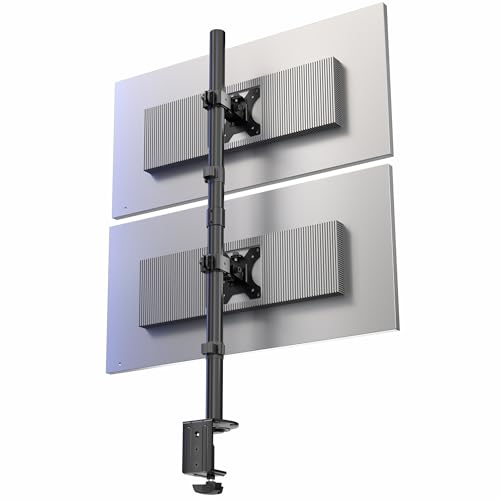
Best for Stacked Monitors
VIVO Dual Vertically Stacked Monitor Stand
Stacks two ultrawides up to 34 inches vertically, 22 lb each.
Best for: Setups stacking two 34-inch ultrawides vertically.
Our take Check price for VIVO Dual Vertically Stacked Monitor Stand (opens in a new tab)

Best Riser With USB Hub
OImaster Monitor Stand Riser with USB 3.0 Hub
A riser with three height settings, a USB 3.0 hub, USB-C port, drawer and phone holder.
Best for: Buyers who want a riser that adds USB ports and small-item storage.
Our take Check price for OImaster Monitor Stand Riser with USB 3.0 Hub (opens in a new tab)

Best Arm for 49-Inch Screens
HUANUO TitanLift Heavy Duty Monitor Arm
A heavy-duty arm for screens up to 49 inches and 44 lb, with a five-year warranty.
Best for: Owners of large or heavy ultrawides who want full arm adjustment.
Our take Check price for HUANUO TitanLift Heavy Duty Monitor Arm (opens in a new tab)
Our Picks
Best High-Capacity Riser1 of 7
WESTREE Dual Monitor Stand Riser on Amazon (opens in a new tab)
The WESTREE is the riser to choose for a heavy ultrawide: a 35.8 x 10.2-inch steel-and-wood platform rated for 150 lb, the highest capacity here, with room underneath for a keyboard.
Best for
- Heavy ultrawides, including large ones, where a simple lift is enough.
Skip if
- You want to adjust height or tilt; an arm like the HUANUO TitanLift does that.
Why we like it
No VESA mount is needed, and WESTREE says it assembles in about two minutes. A non-slip surface keeps the monitor's stand in place.
Height is fixed, and there is no tilt or rotation. Check that your monitor's stand fits within the 10.2-inch depth.
Key dimensions & specs
- Platform: 35.8 x 10.2"
- Construction: steel and wood
- Capacity: 150 lb
- Storage space underneath
- Non-slip surface
Pros
- Highest capacity here
- No VESA needed
- Quick assembly
Cons
- Fixed height
- No tilt or rotation
Best Adjustable-Width Riser2 of 7
Across-Star Dual Monitor Stand Riser on Amazon (opens in a new tab)
The Across-Star is the lowest-priced option here and the only riser with adjustable length: its modular three-piece platform extends from 32 to 40 inches, so it can be sized to your desk and monitor.
Best for
- Desks where a riser needs to fit a specific width.
Skip if
- You need more capacity; the WESTREE is rated for 150 lb.
Why we like it
It is metal and wood, rated for 80 lb, with storage space underneath, and needs no VESA mount.
The 80 lb rating is lower than the WESTREE's, though well above most single monitors, and height is fixed.
Key dimensions & specs
- Length: adjustable, 32–40"
- Construction: metal and wood
- Capacity: 80 lb
- Modular three-piece design
- Storage space underneath
Pros
- Lowest price here
- Adjustable width
- No VESA needed
Cons
- Fixed height
- Lower capacity than the WESTREE
Best Freestanding Stand3 of 7
VIVO Single Monitor Desk Stand (Freestanding) on Amazon (opens in a new tab)
The VIVO freestanding stand is for desks you cannot clamp to, such as rentals, glass tops or shared offices: it holds the monitor by its VESA mount on a weighted steel base.
Best for
- Desks where clamping is not possible or allowed.
Skip if
- You can clamp to the desk and want more height; the VIVO extra-tall mount has a 39-inch pole.
Why we like it
VIVO lists support for ultrawides up to 38 inches with VESA 75 or 100mm, 18 inches of lift, 360-degree rotation and 15 degrees of tilt either way.
The base takes desk space, and the listing does not state a weight limit, so check your monitor's weight against VIVO's full specifications.
Key dimensions & specs
- Mount: freestanding base
- Screen size: up to 38"
- VESA: 75/100mm
- Lift: 18"
- Tilt: ±15°; rotation: 360°
Pros
- No desk clamp needed
- Height, tilt and rotation
- Low price
Cons
- Base takes desk space
- Needs VESA 75/100mm
- Not for 49-inch screens
Best for Sit-Stand Desks4 of 7
VIVO Extra Tall Single Monitor Desk Mount on Amazon (opens in a new tab)
The VIVO extra-tall mount is the pick for standing desks or tall users: its 39-inch pole is the tallest here, leaving room to position the screen high.
Best for
- Sit-stand desks and tall users with a lighter ultrawide.
Skip if
- Your monitor weighs over 22 lb; the HUANUO TitanLift is rated for 44 lb.
Why we like it
It supports ultrawides up to 38 inches and 22 lb, tilts 90 degrees either way and rotates 360 degrees, and mounts with a C-clamp or through a grommet. It is the most widely reviewed stand here.
The 22 lb limit rules out many heavier curved ultrawides, so check your panel's weight without its stand.
Key dimensions & specs
- Pole: 39"
- Screen size: up to 38"
- Capacity: 22 lb
- Tilt: ±90°; rotation: 360°
- Mount: C-clamp or grommet
Pros
- Tallest pole here
- Wide tilt range
- Widely reviewed
Cons
- 22 lb limit
- Needs a VESA mount
Best for Stacked Monitors5 of 7
VIVO Dual Vertically Stacked Monitor Stand on Amazon (opens in a new tab)
The VIVO stacked stand is for a specific layout: two ultrawides, up to 34 inches each, one above the other, which saves desk width compared with two screens side by side.
Best for
- Setups stacking two 34-inch ultrawides vertically.
Skip if
- You use a single ultrawide; a single mount or riser is simpler.
Why we like it
Each arm is rated for 22 lb on a 28.5-inch pole and tilts and rotates independently. It is steel and aluminum and mounts with a C-clamp or grommet.
It does not suit 49-inch screens, and the 22 lb per-arm limit rules out heavier panels.
Key dimensions & specs
- Layout: two monitors stacked
- Screen size: up to 34" each
- Capacity: 22 lb per arm
- Pole: 28.5"
- Tilt: ±15°; rotation: 360° per arm
- Mount: C-clamp or grommet
Pros
- Saves desk width
- Independent adjustment per screen
Cons
- Up to 34 inches only
- 22 lb per arm
Best Riser With USB Hub6 of 7
OImaster Monitor Stand Riser with USB 3.0 Hub on Amazon (opens in a new tab)
The OImaster is the riser to choose if you want more than a shelf: it has three height settings (16.5, 18.5 and 20.5 inches as listed), a built-in USB 3.0 hub and USB-C port, a storage drawer and a phone holder.
Best for
- Buyers who want a riser that adds USB ports and small-item storage.
Skip if
- You have a very wide or heavy monitor stand; the WESTREE is larger and rated higher.
Why we like it
It is ABS and metal, rated for 50 to 55 lb, and folds flat for storage.
It has fewer buyer reviews than the other risers, its capacity is lower, and height adjusts only in fixed steps. Check whether its platform width suits a wide monitor stand.
Key dimensions & specs
- Height settings: 3 (as listed)
- Capacity: 50–55 lb
- Construction: ABS and metal
- USB 3.0 hub and USB-C port
- Drawer, phone holder, folds flat
Pros
- Built-in USB hub
- Adjustable height steps
- Drawer and phone holder
Cons
- Fewer buyer reviews
- Lower capacity than the WESTREE
- Platform width not listed here
Best Arm for 49-Inch Screens7 of 7
HUANUO TitanLift Heavy Duty Monitor Arm on Amazon (opens in a new tab)
The HUANUO TitanLift is the only arm here rated for 49-inch super-ultrawides: HUANUO lists screens up to 49 inches and 44 lb, with an arm it says is 20 percent thicker and a base 30 percent wider than its standard model.
Best for
- Owners of large or heavy ultrawides who want full arm adjustment.
Skip if
- You only need a lift; the WESTREE riser holds more weight for less.
Why we like it
HUANUO states it has been tested through 50,000 movement cycles and backs it with a five-year warranty, the longest here. It uses a dual C-clamp.
It is the most expensive option here at the time of writing, needs a VESA-compatible monitor and a desk edge the clamp can grip.
Key dimensions & specs
- Screen size: up to 49"
- Capacity: up to 44 lb
- Construction: aluminum
- Mount: dual C-clamp
- 50,000-cycle test (manufacturer claim)
- Warranty: 5 years
Pros
- Rated for 49-inch screens
- Highest arm capacity here
- Five-year warranty
Cons
- Most expensive option here
- Needs VESA and a suitable desk edge
How We Chose These Ultrawide Monitor Stands
Each pick was assessed across 4 criteria weighted for real-world use.
- Type
- We separated risers from VESA arms and freestanding stands.
- Capacity and size
- We compared weight ratings and supported screen sizes against typical ultrawides.
- Adjustment and mounting
- We recorded height, tilt and rotation ranges, and clamp, grommet or freestanding mounting.
- Extras and price
- We noted USB hubs, drawers and warranties, and compared price position. Prices change often, so we treat them as relative position.
What to Look for in an Ultrawide Monitor Stand
Key buying criteria so you get the right fit the first time.
Riser or arm
A riser needs no VESA mount and adds storage; an arm adds adjustment and frees desk space but needs VESA and a suitable desk edge.
Weight without the stand
For arms, compare the panel's weight without its stand to the arm's rating. Here, VIVO arms are rated for 22 lb and the HUANUO for 44 lb.
Screen size
VIVO lists support up to 38 inches (34 inches for the stacked stand); only the HUANUO arm is rated for 49 inches.
Platform size for risers
Check that the monitor's stand fits the platform's width and depth. The Across-Star adjusts from 32 to 40 inches wide.
Desk and mounting
C-clamps need a solid desk edge; grommet mounts need a hole; the VIVO freestanding stand needs neither.
How to Choose an Ultrawide Monitor Stand
By priority
| Priority | Consider | Why |
|---|---|---|
| A heavy monitor, simple lift | WESTREE riser | 150 lb, 35.8 inches wide |
| A riser to fit your desk width | Across-Star | 32–40 inches, lowest price |
| A riser with USB | OImaster | USB hub, height steps, drawer |
| No clamping allowed | VIVO freestanding | Weighted base, up to 38 inches |
| Sit-stand desk | VIVO extra tall | 39-inch pole, 22 lb |
| Two stacked ultrawides | VIVO stacked | Up to 34 inches each |
| A 49-inch screen on an arm | HUANUO TitanLift | 44 lb, five-year warranty |
Scroll sideways to see every column.
By price at the time of writing
Prices change frequently; these tiers reflect typical prices when this guide was updated.
| Price tier | Stands |
|---|---|
| About $27–$30 | Across-Star, WESTREE, VIVO freestanding |
| About $40–$44 | VIVO extra tall, OImaster, VIVO stacked |
| About $94 | HUANUO TitanLift |
Frequently Asked Questions
What's the difference between a monitor riser and a monitor arm?
A riser is a platform the monitor's own stand sits on; it needs no VESA mount and often adds storage. An arm holds the monitor by its VESA mount and adds height, tilt and rotation adjustment.
Do I need a VESA mount?
Only for an arm or VESA stand. The WESTREE, Across-Star and OImaster risers do not need one. The VIVO and HUANUO stands need a compatible VESA pattern, typically 75 or 100mm.
Which stand here works for a 49-inch super-ultrawide?
The HUANUO TitanLift is the only arm here rated for 49-inch screens, up to 44 lb. The WESTREE riser's 150 lb rating also covers a 49-inch monitor's weight, as long as the monitor's own stand fits its platform.
Can I start with a riser and move to an arm later?
Yes, they are separate purchases. If you think you will want adjustment, check now that your monitor has a VESA mount and note its weight without the stand.
Why choose a freestanding stand over a clamp arm?
It avoids clamping, which helps in rentals, on glass desks or where clamps are not allowed. The trade-off is that its base takes desk space.
Bottom Line
If you just want the screen higher, a riser is the simple and inexpensive route. The WESTREE handles the most weight, the Across-Star adjusts to your desk width for the lowest price, and the OImaster adds USB ports and height steps.
If you want adjustment, choose an arm rated for your panel. The VIVO extra-tall and freestanding stands suit lighter ultrawides up to 38 inches, the stacked VIVO suits two 34-inch screens, and the HUANUO TitanLift is worth paying more for with a heavy or 49-inch monitor.