
Buying Guide
The Best Lightweight Laptop Screen Extenders for Everyday Desk Work
We looked at 5 lightweight laptop screen extenders side by side, with the trade-offs that separate them and who each one suits.
By Jamie Cole, Lead Product Researcher
9 min read5 products evaluated
We may earn a commission from purchases made through links in this guide. Learn more.
Actual measured weight matters more than marketing language like 'lightweight' or 'ultra-thin', since two panels of the same screen size can differ by half a pound or more depending on panel type and frame material.
A lighter panel sometimes uses a thinner frame that can flex more under pressure, worth checking reviews for reports of build quality rather than assuming light automatically means fragile or vice versa.
Quick Picks
Our 5 recommendations at a glance. Tap a pick for the full verdict.

Best Lightweight Laptop Screen Extender Overall
KEFEYA Laptop Screen Extender, 14" FHD 1080P IPS Laptop Monitor Extender Dual Screen, Portable Monitor for Laptops 13-17" with USB-C/HDMI Port, Plug n Play for Windows/Mac/Android/Switch/PS5
Buyers wanting a well-proven balance of light weight and confirmed build quality
Our take Check price for KEFEYA Laptop Screen Extender, 14" FHD 1080P IPS Laptop Monitor Extender Dual Screen, Portable Monitor for Laptops 13-17" with USB-C/HDMI Port, Plug n Play for Windows/Mac/Android/Switch/PS5 (opens in a new tab)

Lightest Overall Pick
Screnex 15.6" Laptop Screen Extender New Upgraded Ultra-Thin & Light, Triple Portable Monitor 1080P FHD IPS, USB-C/HDMI Plug & Play for 13-17.3" Laptop, Travel Monitor Extender for Windows/Mac/Chrome
Buyers wanting the lightest possible weight even with a multi-panel setup
Our take Check price for Screnex 15.6" Laptop Screen Extender New Upgraded Ultra-Thin & Light, Triple Portable Monitor 1080P FHD IPS, USB-C/HDMI Plug & Play for 13-17.3" Laptop, Travel Monitor Extender for Windows/Mac/Chrome (opens in a new tab)

Best Lightweight Single-Panel Value Pick
KYY Portable Monitor for Laptop, Travel Monitor with Stand Support Two Mode
Buyers wanting a light single-panel extender at a budget price
Our take Check price for KYY Portable Monitor for Laptop, Travel Monitor with Stand Support Two Mode (opens in a new tab)

Best Compact Lightweight Pick
Portable Monitor Laptop Screen Extender, Compact Dual/Triple Screen Display
Buyers wanting both a smaller footprint and lighter overall weight
Our take Check price for Portable Monitor Laptop Screen Extender, Compact Dual/Triple Screen Display (opens in a new tab)
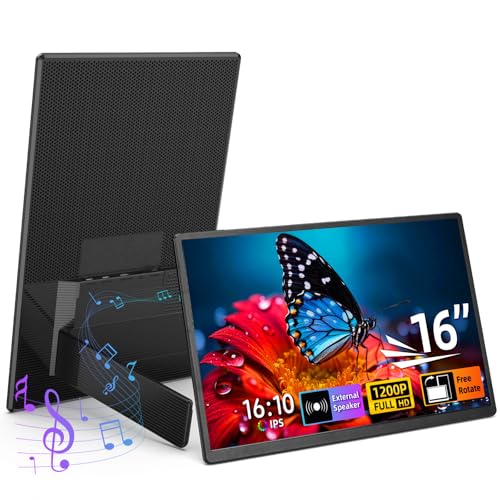
Best Lightweight Pick with Integrated Stand
16" Portable Monitor for Laptop with Speakers and Stand, 1200P FHD IPS Laptop Screen Extender
Buyers wanting a larger panel with integrated functionality that still keeps weight reasonable
Our take Check price for 16" Portable Monitor for Laptop with Speakers and Stand, 1200P FHD IPS Laptop Screen Extender (opens in a new tab)
Our Picks
Best Lightweight Laptop Screen Extender Overall1 of 5
KEFEYA Laptop Screen Extender, 14" FHD 1080P IPS Laptop Monitor Extender Dual Screen, Portable Monitor for Laptops 13-17" with USB-C/HDMI Port, Plug n Play for Windows/Mac/Android/Switch/PS5 on Amazon (opens in a new tab)
6" Laptop Screen Extender New Upgraded Ultra-Thin & Light for one main reason.
Best for
- Buyers wanting a well-proven balance of light weight and confirmed build quality
Why we like it
6" Laptop Screen Extender New Upgraded Ultra-Thin & Light, which is worth weighing if cost is your deciding factor between the two.
On the other side, Mid-range price relative to the most budget-focused picks.
Key dimensions & specs
- 14-inch FHD IPS panel
- Balanced weight-to-rigidity build
- USB-C and HDMI ports
- Fits 13-17 inch laptops
Pros
- Reasonably light without excessive frame flex
- Plug-and-play, minimal added cable bulk
- Fits a broad laptop size range
Cons
- Not the absolute lightest option in this guide
- Verify actual measured weight rather than assuming from size alone
- Mid-range price relative to the most budget-focused picks
Lightest Overall Pick2 of 5
Screnex 15.6" Laptop Screen Extender New Upgraded Ultra-Thin & Light, Triple Portable Monitor 1080P FHD IPS, USB-C/HDMI Plug & Play for 13-17.3" Laptop, Travel Monitor Extender for Windows/Mac/Chrome on Amazon (opens in a new tab)
Explicitly built around minimizing weight, one of the lighter triple-screen designs available given the ultra-thin panel construction.
Best for
- Buyers wanting the lightest possible weight even with a multi-panel setup
Why we like it
On the other side, Triple-panel setup adds overall weight despite thin individual panels.
Key dimensions & specs
- 15.6-inch, ultra-thin and light build
- Triple-screen configuration
- USB-C and HDMI connectivity
- Explicitly weight-optimized
Pros
- one of the lightest triple-screen options available
- Explicitly designed around weight reduction
- Dual connectivity options
Cons
- Higher price than simpler single-panel lightweight picks
- Verify frame rigidity through current reviews given the thin build
- Triple-panel setup adds overall weight despite thin individual panels
Best Lightweight Single-Panel Value Pick3 of 5
KYY Portable Monitor for Laptop, Travel Monitor with Stand Support Two Mode on Amazon (opens in a new tab)
A light single-panel design, its two-mode stand keeps the overall build simple rather than adding extra hardware weight.
Best for
- Buyers wanting a light single-panel extender at a budget price
Why we like it
6" Laptop Screen Extender New Upgraded Ultra-Thin & Light.
On the other side, Verify actual measured weight against your specific laptop bag limit.
Key dimensions & specs
- Single-panel, two-mode stand support
- low-cost price
- Light overall build
Pros
- light single-panel weight
- low-cost price for the weight class
- Simple two-mode stand avoids extra hardware bulk
Cons
- Single-screen only, no multi-panel option
- Verify actual measured weight against your specific laptop bag limit
Best Compact Lightweight Pick4 of 5
Portable Monitor Laptop Screen Extender, Compact Dual/Triple Screen Display on Amazon (opens in a new tab)
A compact build that keeps overall weight down through smaller panel dimensions rather than just thinner materials, appropriate for buyers who want a smaller footprint alongside lighter weight.
Best for
- Buyers wanting both a smaller footprint and lighter overall weight
Why we like it
On the other side, Build robustness at this weight less proven than top picks.
Key dimensions & specs
- Compact panel dimensions
- Dual/triple screen configuration options
- low-cost price
Pros
- Compact size contributes to lower overall weight
- low-cost price
- Configurable dual/triple setup
Cons
- Verify exact weight specs against your carrying needs
- Build robustness at this weight less proven than top picks
Best Lightweight Pick with Integrated Stand5 of 5
16" Portable Monitor for Laptop with Speakers and Stand, 1200P FHD IPS Laptop Screen Extender on Amazon (opens in a new tab)
On the other side, Verify total weight against your specific bag capacity.
Best for
- Buyers wanting a larger panel with integrated functionality that still keeps weight reasonable
Key dimensions & specs
- 16-inch 1200P panel
- Integrated stand
- Speakers included
Pros
- Integrated stand avoids extra accessory weight
- 1200P resolution for extra vertical workspace
- Speakers included, no separate accessory needed
Cons
- Larger 16-inch size means more overall weight than compact single-panel picks
- Not the lightest option here given the bigger panel
- Verify total weight against your specific bag capacity
How We Chose These Lightweight Laptop Screen Extenders
Each pick was assessed across 4 criteria weighted for real-world use.
- Actual measured weight prioritized over marketing terms
- Prioritized actual weight specs over marketing language like 'lightweight' or 'ultra-thin', since two similarly sized panels can differ by half a pound or more.
- Frame rigidity checked against reduced weight
- Checked reviews for reports of frame flex on the lightest builds, since a lighter frame sometimes trades off some rigidity for reduced weight.
- Weight-to-workspace ratio considered for multi-panel picks
- Weighed overall added weight against workspace gain for multi-panel designs, since more panels always add weight regardless of individual panel thinness.
- Integrated hardware weighed against separate accessories
- Considered whether integrated stands or speakers add meaningful weight compared to needing separate accessories that would add their own carrying weight.
What to Look for in a Lightweight Laptop Screen Extender
Key buying criteria so you get the right fit the first time.
Match the extender's screen size proportionally to your laptop, not just to the biggest option available
A screen extender attaches directly alongside your laptop's own display, so its physical size needs to pair proportionally with your laptop's screen rather than simply being as large as possible, since an extender significantly larger or smaller than your laptop's own panel creates a visually unbalanced setup and can make the attachment hardware work harder to support the size difference.
6 or 16-inch laptop balances better with an extender in that same size range.
Check your own laptop's screen size first, then choose an extender sized to match it rather than assuming a bigger panel is automatically a better upgrade.
Understand that resolution and physical size together determine real sharpness, not either spec alone
This means a smaller extender is not automatically a downgrade in visual quality, and buyers chasing the largest available screen size at a fixed resolution should understand they're trading pixel density for physical workspace, a genuine tradeoff rather than a straightforward size-equals-better relationship.
Compare both the stated resolution and the physical panel size together, and calculate or look up the resulting pixel density (pixels per inch) if sharpness matters more to you than raw screen real estate.
Confirm the connection type actually matches your laptop's available ports
Screen extenders connect via USB-C (which can carry both video and power over a single cable on laptops that support USB-C DisplayPort alt mode), HDMI (video only, requiring a separate power cable to the extender), or both, and this isn't just a convenience detail, since a laptop without a USB-C port that supports video output simply cannot drive a USB-C-only extender regardless of how the cable physically connects.
This is a genuine, easy-to-miss compatibility trap: not every USB-C port on a laptop supports video output (some are power or data only), so having a USB-C port at all doesn't guarantee this specific use case will work.
Check your specific laptop model's documentation for confirmed USB-C DisplayPort alt mode support, or favor an extender with both USB-C and HDMI options to cover either connection path.
Check the attachment mechanism against how you'll actually use the extender day to day
Extenders attach to a laptop through a few different mechanisms, magnetic mounts (quick to attach and remove but rely on magnet strength holding position), clip-on or clamp designs (a firmer physical grip on the laptop lid but slower to attach and remove), or a separate kickstand base (fully independent positioning but adds desk footprint and doesn't travel attached to the laptop).
Someone who frequently packs up and travels with their setup benefits from a fast magnetic or clip attachment, while someone with a permanent desk setup may prefer a stand-based design that doesn't touch or stress the laptop's own lid hinge at all.
Match the attachment mechanism to your actual daily routine (frequent travel and reassembly versus a fixed desk setup) rather than defaulting to whichever style looks most premium in photos.
Weigh review volume against star rating, since panel size categories vary widely in review depth
6 inches generally have a much larger pool of dedicated extenders and far more accumulated reviews than less common sizes like 17-inch or specialty categories like touchscreen or 4K extenders, which means a high star rating on a niche-size listing often rests on a meaningfully smaller review sample than the same rating on a mainstream-size product.
When comparing extenders, especially at a less common size or in a specialty category, check both the star rating and the review count together rather than trusting the rating figure alone.
How to Choose a Lightweight Laptop Screen Extender
| Recommended pick in this comparison | |
|---|---|
| 16" Portable Monitor for Laptop with Speakers and Stand |
| KYY Portable Monitor for Laptop | |
| 16" Portable Monitor for Laptop with Speakers and Stand | |
| No firm budget ceiling, prioritizing build or features | 6" Laptop Screen Extender New Upgraded Ultra-Thin & Light |
- Attaches directly to the laptop lid for a compact, travel-friendly setup that moves with the laptop. In this comparison: check each listing's attachment mechanism directly.
- Sits independently on the desk, keeping stress off the laptop's own lid hinge but adding desk footprint. In this comparison: KYY Portable Monitor for Laptop, 16" Portable Monitor for Laptop with Speakers and Stand.
Default to a clip-on or magnetic pick like KYY Portable Monitor for Laptop if you travel with your laptop often, and consider a stand-based design if this is a permanent desk setup.
| Flexible power and video routing |
|---|
For Video Calls and Presentations Specifically
- A swivel or adjustable-angle mechanism specifically, so you can reposition the extended screen toward a camera or a colleague without moving the whole laptop.
- 6" Laptop Screen Extender New Upgraded Ultra-Thin & Light offers: one of the lightest triple-screen options available. That's a real functional upgrade over the budget picks here, not just a brand markup.
- KYY Portable Monitor for Laptop already covers the essentials: light single-panel weight. The main thing you'd be paying extra for elsewhere in this list is build quality or features you may not need.
Frequently Asked Questions
Does 'lightweight' marketing language reflect actual product weight?
Not always precisely, actual measured weight matters more, since two similarly sized panels can differ by half a pound or more depending on materials.
Are the lightest laptop screen extenders less durable?
Not necessarily, but a lighter frame can sometimes flex more, check reviews for build quality reports before assuming light means fragile.
Do triple-screen extenders weigh much more than single-panel ones?
Yes, more panels always add weight regardless of individual panel thinness, weigh the extra workspace against the added carrying weight.
Do integrated stands add much weight to a screen extender?
Usually less than a separate stand accessory would, an integrated stand can actually reduce your total carrying weight.
Bottom Line
Best overall: KEFEYA Laptop Screen Extender, 14" FHD 1080P IPS Laptop Monitor Extender Dual Screen, Portable Monitor for Laptops 13-17" with USB-C/HDMI Port, Plug n Play for Windows/Mac/Android/Switch/PS5 — best lightweight laptop screen extender overall pick in this roundup. See the full verdicts above for every pick, with pros, cons and who each one suits.
Browse all lightweight laptop screen extenders on Amazon — Prime-eligible options with current pricing.