
Buying Guide
The Best Docking Stations with 2.5Gb Ethernet, and Which Ones Confirm It
Seven docks compared on whether they actually confirm 2.5Gb Ethernet, plus displays, charging and ports.
By Jamie Cole, Lead Product Researcher
9 min read7 products evaluated
We may earn a commission from purchases made through links in this guide. Learn more.
A 2.5Gb Ethernet port only helps if your network supports it: a 2.5GbE router or switch, or a fast NAS. On a standard Gigabit network, a 2.5GbE dock runs at Gigabit speed.
Of the seven docks here, only two listings clearly state 2.5GbE: the UGREEN Revodok Max 213 (Thunderbolt 4) and the TobenONE 16-in-1 (USB-C). The others don't confirm the speed in their summaries, and the Plugable is described elsewhere as Gigabit, so check before buying.
Our comparison is based on published specifications, not hands-on testing.
Quick Picks
Our 7 recommendations at a glance. Tap a pick for the full verdict.

Best Thunderbolt 4 Dock with 2.5GbE
UGREEN 13-in-1 Thunderbolt 4 Dock, 40Gbps (Revodok Max 213)
A 13-in-1 Thunderbolt 4 dock with 2.5 Gigabit Ethernet, dual 4K@60Hz or 8K, 90W and an SD 4.0 reader.
Best for: Thunderbolt laptops on a 2.5GbE network.
Our take Check price for UGREEN 13-in-1 Thunderbolt 4 Dock, 40Gbps (Revodok Max 213) (opens in a new tab)

Thunderbolt 4 Dock (Ethernet Speed to Confirm)
Plugable Thunderbolt 4 Dock for M4/M5 MacBook Air & Pro (TBT-UDM)
A Thunderbolt 4 certified dock with 100W charging, dual 4K or single 6K output, SD and Ethernet.
Best for: Thunderbolt and recent MacBook users who want dependable dual-display docking.
Our take Check price for Plugable Thunderbolt 4 Dock for M4/M5 MacBook Air & Pro (TBT-UDM) (opens in a new tab)

Best USB-C Dock with 2.5GbE
TobenONE 16-in-1 Laptop Docking Station, Triple 4K Monitor
A 16-in-1 dock with 2.5Gbps Ethernet, three 4K HDMI outputs, 7 USB ports and a 150W power supply.
Best for: USB-C laptops on a 2.5GbE network with several monitors.
Our take Check price for TobenONE 16-in-1 Laptop Docking Station, Triple 4K Monitor (opens in a new tab)

Triple 4K DisplayLink (Ethernet Speed to Confirm)
Anker Prime Docking Station (DL7400), 14-Port with DisplayLink
A 14-port DisplayLink dock with triple 4K at 60Hz, 140W output and a cooling fan.
Best for: Windows laptops driving three 4K monitors.
Our take Check price for Anker Prime Docking Station (DL7400), 14-Port with DisplayLink (opens in a new tab)
Most Ports (Ethernet Speed to Confirm)
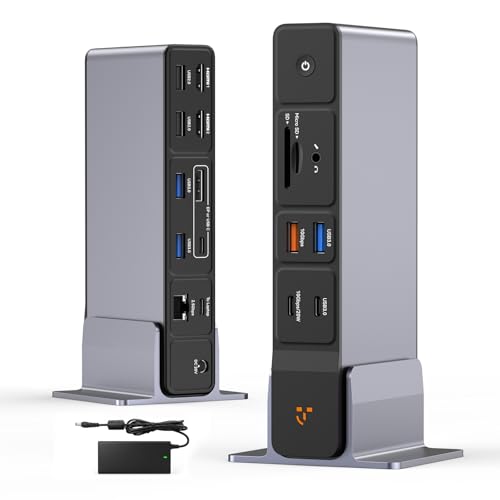
TobenONE USB C Docking Station 3 Monitors, 18-in-1 Triple 4K Display
An 18-in-1 dock with triple 4K via HDMI/DP/USB-C, 8 USB ports up to 10Gbps and a 150W adapter.
Best for: Windows or Chromebook desks needing many ports.
Our take Check price for TobenONE USB C Docking Station 3 Monitors, 18-in-1 Triple 4K Display (opens in a new tab)

MacBook-Focused Dock (Ethernet Speed to Confirm)
TobenONE 18-in-2 MacBook Docking Station, Dual Monitor 4K@60Hz
A MacBook-focused 18-in-2 dock with dual 4K@60Hz and a 150W adapter.
Best for: MacBooks needing two 4K displays.
Our take Check price for TobenONE 18-in-2 MacBook Docking Station, Dual Monitor 4K@60Hz (opens in a new tab)

Compact Triple-Display Dock (Ethernet Speed to Confirm)
Baseus Spacemate Laptop Docking Station, 11-in-1
An 11-in-1 Baseus dock with triple display, 10Gbps USB, Ethernet and 100W PD.
Best for: A compact multi-display desk.
Our take Check price for Baseus Spacemate Laptop Docking Station, 11-in-1 (opens in a new tab)
Our Picks
Best Thunderbolt 4 Dock with 2.5GbE1 of 7
UGREEN 13-in-1 Thunderbolt 4 Dock, 40Gbps (Revodok Max 213) on Amazon (opens in a new tab)
The UGREEN Revodok Max 213 combines Thunderbolt 4 with 2.5 Gigabit Ethernet, the feature this guide is about, plus dual 4K at 60Hz or a single 8K display, 90W charging and a UHS-II-class SD/TF 4.0 reader.
Best for
- Thunderbolt laptops on a 2.5GbE network.
Skip if
- Your laptop has plain USB-C; the TobenONE 16-in-1 lists 2.5GbE over USB-C.
Why we like it
It was the most expensive dock here at the time of writing, and 90W is below the 100W some laptops use.
Key dimensions & specs
- Connection: Thunderbolt 4, 40Gbps
- Ethernet: 2.5GbE
- Displays: dual 4K@60Hz or 8K
- Charging: 90W
- Card reader: SD/TF 4.0
Pros
- 2.5GbE confirmed
- Thunderbolt 4
- Fast card reader
Cons
- Most expensive here
- 90W charging
- Needs Thunderbolt/USB4 for full use
Thunderbolt 4 Dock (Ethernet Speed to Confirm)2 of 7
Plugable Thunderbolt 4 Dock for M4/M5 MacBook Air & Pro (TBT-UDM) on Amazon (opens in a new tab)
The Plugable TBT-UDM is a certified Thunderbolt 4 dock with 100W charging, dual 4K or single 6K output, six USB ports, SD and Ethernet, driverless on Mac and Windows.
Best for
- Thunderbolt and recent MacBook users who want dependable dual-display docking.
Skip if
- 2.5GbE is essential; the UGREEN Revodok Max 213 confirms it.
Why we like it
In other listings its Ethernet port is described as Gigabit, not 2.5GbE; confirm the speed before buying it for a 2.5GbE network.
Key dimensions & specs
- Certification: Thunderbolt 4
- Charging: up to 100W
- Displays: dual 4K or single 6K
- Ports: 6x USB, SD, Ethernet
- Setup: driverless (Mac, Windows)
Pros
- Thunderbolt 4 certified
- Driverless on Mac and Windows
- SD and Ethernet
Cons
- Ethernet may be Gigabit, not 2.5GbE
- Two displays maximum
- Needs a Thunderbolt/USB4 port
Best USB-C Dock with 2.5GbE3 of 7
TobenONE 16-in-1 Laptop Docking Station, Triple 4K Monitor on Amazon (opens in a new tab)
The TobenONE 16-in-1 confirms 2.5Gbps Ethernet on a USB-C dock and adds three HDMI outputs for triple 4K, seven USB ports and a 150W power supply.
Best for
- USB-C laptops on a 2.5GbE network with several monitors.
Skip if
- You use a Mac; the TobenONE 18-in-2 targets MacBooks.
Why we like it
The listing summary doesn't state how the three displays are driven or their refresh rate; on Macs and some laptops, three displays may require DisplayLink or not be possible.
Key dimensions & specs
- Ethernet: 2.5Gbps
- Displays: 3x HDMI, 4K
- USB: 7 ports
- Power supply: 150W
Pros
- 2.5GbE confirmed
- Three HDMI outputs
- Lower price than the UGREEN
Cons
- Display method/refresh not detailed
- Laptop charging wattage not stated
- Less established brand
Triple 4K DisplayLink (Ethernet Speed to Confirm)4 of 7
Anker Prime Docking Station (DL7400), 14-Port with DisplayLink on Amazon (opens in a new tab)
The Anker Prime DL7400 drives three 4K displays at 60Hz through DisplayLink, which is uncommon, with 140W total output, a built-in cooling fan and a display status indicator.
Best for
- Windows laptops driving three 4K monitors.
Skip if
- 2.5GbE is essential; confirm the Ethernet speed first, or choose the UGREEN or TobenONE 16-in-1.
Why we like it
Anker lists it for Windows laptops with the latest DisplayLink driver installed. It isn't Thunderbolt certified.
Key dimensions & specs
- Displays: triple 4K@60Hz via DisplayLink
- Output: 140W max
- Cooling: built-in fan
- Ports: 14
- OS: Windows (driver required)
Pros
- Three 4K 60Hz displays
- 140W
- Cooling fan
Cons
- Ethernet speed not stated in summary
- Driver required
- Windows-focused
Most Ports (Ethernet Speed to Confirm)5 of 7
TobenONE USB C Docking Station 3 Monitors, 18-in-1 Triple 4K Display on Amazon (opens in a new tab)
The TobenONE 18-in-1 offers the most ports here: eight USB ports up to 10Gbps, triple 4K output across HDMI, DisplayPort and USB-C, and a 150W adapter with a 20W fast-charge port.
Best for
- Windows or Chromebook desks needing many ports.
Skip if
- 2.5GbE is essential; the TobenONE 16-in-1 confirms it.
Why we like it
It lists Windows and ChromeOS compatibility.
The listing summary doesn't confirm 2.5GbE, so check the Ethernet speed.
Key dimensions & specs
- Displays: triple 4K (HDMI/DP/USB-C)
- USB: 8 ports up to 10Gbps
- Power: 150W adapter + 20W port
- OS: Windows, ChromeOS
Pros
- Many ports
- Triple 4K
- Lowest price here
Cons
- 2.5GbE not confirmed
- Mac not listed
- Less established brand
MacBook-Focused Dock (Ethernet Speed to Confirm)6 of 7
TobenONE 18-in-2 MacBook Docking Station, Dual Monitor 4K@60Hz on Amazon (opens in a new tab)
The TobenONE 18-in-2 is aimed at MacBooks, connecting over two cables to support dual 4K at 60Hz, with many USB and data ports and a 150W adapter.
Best for
- MacBooks needing two 4K displays.
Skip if
- 2.5GbE is essential; confirm it first.
Why we like it
The listing summary doesn't confirm 2.5GbE or give exact port details.
Key dimensions & specs
- Connection: 2 cables (18-in-2)
- Displays: dual 4K@60Hz
- Power: 150W adapter
- Focus: MacBook
Pros
- MacBook-focused
- Dual 4K@60Hz
- Many ports
Cons
- 2.5GbE not confirmed
- Uses two ports on the Mac
- Details not in summary
Compact Triple-Display Dock (Ethernet Speed to Confirm)7 of 7
Baseus Spacemate Laptop Docking Station, 11-in-1 on Amazon (opens in a new tab)
The Baseus Spacemate is a compact 11-in-1 dock with triple display output over 4K HDMI and DisplayPort, 10Gbps USB-C and USB-A, Ethernet, audio and 100W charging, with a power adapter included.
Best for
- A compact multi-display desk.
Skip if
- 2.5GbE is essential; the UGREEN or TobenONE 16-in-1 confirms it.
Why we like it
The listing summary doesn't confirm 2.5GbE.
Key dimensions & specs
- Displays: triple (4K HDMI + DP)
- Data: 10Gbps USB-C/A
- Charging: 100W PD
- Ethernet: speed not stated
Pros
- Compact
- 100W
- 10Gbps data
Cons
- 2.5GbE not confirmed
- Triple display depends on laptop
- Fewer ports than TobenONE
How We Chose These Docking Stations with 2.5Gb Ethernet
Each pick was assessed across 4 criteria weighted for real-world use.
- Ethernet
- We checked whether 2.5GbE is stated.
- Displays
- We compared outputs and refresh rates.
- Charging and ports
- We compared power and port counts.
- Price
- We compared prices at the time of writing.
What to Look for in a Docking Station with 2.5Gb Ethernet
Key buying criteria so you get the right fit the first time.
Confirm 2.5GbE in the listing
Only the UGREEN 213 and TobenONE 16-in-1 state it here.
Check your network
You need 2.5GbE on the router, switch or NAS to benefit.
Match the port
Thunderbolt docks need a Thunderbolt/USB4 port for full bandwidth.
Check displays and charging
Displays and wattage vary; triple display depends on your laptop.
How to Choose a Docking Station with 2.5Gb Ethernet
By need
| Need | Consider |
|---|---|
| Confirmed 2.5GbE, Thunderbolt | UGREEN Revodok Max 213 |
| Confirmed 2.5GbE, USB-C | TobenONE 16-in-1 |
| Most ports | TobenONE 18-in-1 (confirm Ethernet) |
| MacBook, dual 4K | TobenONE 18-in-2 (confirm Ethernet) |
| Triple 4K, Windows | Anker DL7400 (confirm Ethernet) |
Frequently Asked Questions
Do I need 2.5GbE?
Only if your network supports it and you move large files, for example to a NAS.
Will it work on a Gigabit network?
Yes, at Gigabit speed.
Which docks confirm 2.5GbE?
The UGREEN Revodok Max 213 and TobenONE 16-in-1.
Is Thunderbolt required?
No. The TobenONE 16-in-1 offers 2.5GbE over USB-C.
Can I use Wi-Fi instead?
Yes, but wired Ethernet is typically more consistent for large transfers.
Bottom Line
If 2.5GbE is the priority, choose a dock that states it: the UGREEN Revodok Max 213 for Thunderbolt laptops, or the TobenONE 16-in-1 over USB-C for less.
The other docks here may suit your displays and ports, but confirm their Ethernet speed before buying for a 2.5GbE network.