
Buying Guide
The Best 10GbE USB-C Ethernet Adapters for a Better Desk Setup
We looked at 4 10GbE USB-C ethernet adapters side by side, with the trade-offs that separate them and who each one suits.
By Jamie Cole, Lead Product Researcher
6 min read4 products evaluated
We may earn a commission from purchases made through links in this guide. Learn more.
X port, a hard requirement that trips up buyers who assume any USB-C port works.
We required a documented 10GbE controller and checked how honestly each listing represents real-world throughput versus the theoretical link rate, since heat and driver requirements vary meaningfully across this tier.
Quick Picks
Our 4 recommendations at a glance. Tap a pick for the full verdict.

Best Overall (WoL + PXE)
Sabrent Thunderbolt & USB4 10GbE Adapter (NT-P10G)
Buyers prioritizing true 10gbe, requires thunderbolt 3/4/5 or usb4
Our take Check price for Sabrent Thunderbolt & USB4 10GbE Adapter (NT-P10G) (opens in a new tab)

Best for Low Heat
Cable Matters USB-C to 10Gb Ethernet Adapter
buyers prioritizing 10g/5g/2.5g/1g/100m auto-negotiation via rtl8159
Our take Check price for Cable Matters USB-C to 10Gb Ethernet Adapter (opens in a new tab)
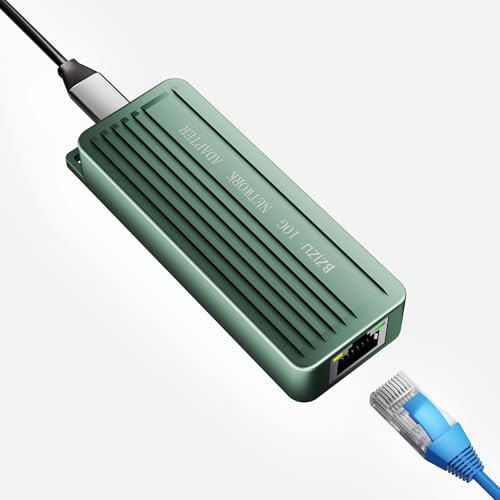
Most Affordable
10GbE USB-C Adapter with RTL8159 Chip (Generic)
Buyers prioritizing 10g via rtl8159, requires driver on windows
Our take Check price for 10GbE USB-C Adapter with RTL8159 Chip (Generic) (opens in a new tab)

Best Chipset (AQC113)
WAVLINK USB4 to 10Gbps Ethernet Adapter (AQC113)
Buyers prioritizing 10gbps via aqc113-b1 (marvell aqtion) chip
Our take Check price for WAVLINK USB4 to 10Gbps Ethernet Adapter (AQC113) (opens in a new tab)
Our Picks
Best Overall (WoL + PXE)1 of 4
Sabrent Thunderbolt & USB4 10GbE Adapter (NT-P10G) on Amazon (opens in a new tab)
The aluminum housing doubles as a heatsink and runs warm during sustained transfers, which Sabrent says is normal for 10GbE.
Best for
- Buyers prioritizing true 10gbe, requires thunderbolt 3/4/5 or usb4
Why we like it
Supports Wake-on-LAN and PXE boot, with jumbo frames and receive-buffer tuning available for maximum throughput.
Key dimensions & specs
- True 10GbE, requires Thunderbolt 3/4/5 or USB4
- Aluminum heatsink housing
- WoL + PXE boot support
Pros
- Genuine 10GbE with WoL and PXE boot for IT/pro environments
- Aluminum housing doubles as a heatsink for sustained transfers
- Auto-negotiates cleanly down through 5G/2.5G/1G/100M
- Bus-powered, no separate power brick needed
Cons
- Will not work at all on standard USB-C or USB 3.x-only ports, Thunderbolt/USB4 required
- Windows/Linux need the separate Marvell AQC113 driver
Best for Low Heat2 of 4
Cable Matters USB-C to 10Gb Ethernet Adapter on Amazon (opens in a new tab)
Built around the Realtek RTL8159 USB 10G controller specifically to address the heat concerns common with other 10GbE adapters, with an integrated thermal silicone pad and heat sink.
Best for
- buyers prioritizing 10g/5g/2.5g/1g/100m auto-negotiation via rtl8159
Why we like it
Cable Matters is transparent that real-world Windows throughput is typically ~7Gbps and macOS may report only a 5Gb link rate depending on the Mac model, rather than overselling the theoretical 10Gbps link rate.
Key dimensions & specs
- 10G/5G/2.5G/1G/100M auto-negotiation via RTL8159
- Real-world ~7Gbps Windows, ~5Gbps macOS documented
- Integrated thermal silicone + heat sink
Pros
- RTL8159 chip specifically engineered to reduce heat versus competing 10GbE adapters
- Transparent, honest real-world throughput documentation rather than only advertising link rate
- Braided pigtail cable adds strain relief for dock setups
- Continuously validated macOS performance with published notes
Cons
- Not for Android or Xbox One S
- Best results require a USB 3.2 Gen 2x2 (20Gbps) port or higher
Most Affordable3 of 4
10GbE USB-C Adapter with RTL8159 Chip (Generic) on Amazon (opens in a new tab)
Built on the same RTL8159 chipset as Cable Matters' 10G adapter for low heat and stable 10Gbps speeds, but explicitly requires a driver install on Windows to unlock full speed, without it, speed is capped at 100Mbps.
Best for
- Buyers prioritizing 10g via rtl8159, requires driver on windows
Why we like it
1 ports cap at 5Gbps. Auto-negotiates across 5 speed tiers with a premium aluminum heatsink housing.
Key dimensions & specs
- 10G via RTL8159, requires driver on Windows
- USB 3.2 Gen 2x2 or TB3/4 required for full speed
- 5-speed auto-negotiation
Pros
- Lower price than Sabrent's or WAVLINK's 10GbE options
- RTL8159 chip for low-heat stable operation
- 5-speed auto-negotiation (10G/5G/2.5G/1G/100M)
- Premium aluminum heatsink housing
Cons
- Windows speed caps at 100Mbps without installing the driver first, an easy trap for unaware buyers
- Standard USB 3.0/3.1 ports cap this at 5Gbps, not the full 10G
Best Chipset (AQC113)4 of 4
WAVLINK USB4 to 10Gbps Ethernet Adapter (AQC113) on Amazon (opens in a new tab)
Built specifically for USB4 and Thunderbolt 3/4/5, using the AQC113-B1 chipset from Marvell (AQtion) for consistent throughput and low latency under heavy workloads, with macOS including native drivers.
Best for
- Buyers prioritizing 10gbps via aqc113-b1 (marvell aqtion) chip
Why we like it
0, or with mobile phones or tablets. Windows and Linux require manual driver installation with instructions included.
Key dimensions & specs
- 10Gbps via AQC113-B1 (Marvell AQtion) chip
- USB4/Thunderbolt 3/4/5 only, not USB 3.x-only hosts
- Dual LED status indicators
Pros
- AQC113-B1 chipset is a proven, high-performance controller for sustained 10G workloads
- macOS includes native drivers, no manual install needed
- Dual LED indicators show link speed and activity separately
- Compact aluminum design with passive heat dissipation
Cons
- Not compatible with USB 3.2/3.1/3.0/2.0-only hosts, or phones/tablets
- Windows and Linux require manual driver installation
How We Chose These 10GbE USB-C Ethernet Adapters
Each pick was assessed across 5 criteria weighted for real-world use.
- 5G/5G/10G) and, where published, the specific Realtek, Marvell, or other controller chip driving it, rather than assuming USB-C connector shape implies a speed tier.
- 2 Gen 2 vs Thunderbolt/USB4) and confirmed OS support, since several products in this cluster have real exclusions (Android, Nintendo Switch, older Apple silicon).
- Favored listings that publish honest real-world throughput or explicit host-speed caveats over ones that only quote the theoretical link rate.
- Weighed braided cable construction, aluminum housing, and reinforced connectors, since these adapters see frequent plug/unplug cycles in daily use.
- Prioritized real differences like Wake-on-LAN, PXE boot, PD passthrough wattage, and multiport expansion over marketing language that repeats across nearly identical adapters.
What to Look for in a 10GbE USB-C Ethernet Adapter
Key buying criteria so you get the right fit the first time.
USB-C is a connector, not a speed
A USB-C port can carry anywhere from 1Gbps to 10Gbps of Ethernet depending on the adapter's chipset and your host's actual USB generation. Check the exact Ethernet speed and required USB mode before assuming any USB-C adapter matches your needs.
Multi-gig speeds need a fast enough USB port
0 (5Gbps) port will not reach its rated Ethernet speed. 2 Gen 2 (10Gbps) port or Thunderbolt/USB4 host.
Check OS and driver requirements before buying
Most Gigabit adapters are driver-free on Windows, macOS, and ChromeOS, but multi-gig adapters often need a manufacturer driver on Windows or specific Linux kernel versions, and some models exclude older Apple silicon chips entirely.
Confirm your specific device isn't excluded
Several adapters in this cluster explicitly do not work with Nintendo Switch, Android, or specific Mac chip generations. Read the compatibility list carefully rather than assuming a USB-C connector guarantees your device will work.
A CAT6 cable matters as much as the adapter
Even a genuine Gigabit-capable adapter will fall back to slower speeds over an old CAT5 cable. Use CAT6 or better for Gigabit, and CAT6A for 5G/10G speeds, to actually realize the adapter's rated performance.
PD passthrough wattage isn't automatically usable
An adapter rated for 100W or 140W Power Delivery passthrough only delivers that much power if you also supply a charger and cable rated for it. The adapter's rating is a ceiling, not a guarantee, without the matching charger.
How to Choose a 10GbE USB-C Ethernet Adapter
Confirm Your Host Before Buying
Every adapter here requires Thunderbolt 3/4/5 or USB4. A standard USB-C laptop port without one of these will not work at all, not just run slower.
If you're not sure which port type your laptop has, check its exact model specs before buying any 10GbE adapter, since these are the most host-restrictive products in this entire category.
The budget 10GbE adapter (B0FY4RVJNM) caps at 100Mbps on Windows until you manually install its driver, an easy trap for buyers expecting true plug-and-play.
| True plug-and-play on Mac and PC | Sabrent NT-P10G (macOS/most TB4/USB4 systems) |
|---|---|
| Lowest heat during sustained transfers | Cable Matters (RTL8159, engineered for low heat) |
| Lowest price, willing to install a driver |
Frequently Asked Questions
Can I use a 10GbE adapter on a regular USB-C laptop port?
No, not with any product in this cluster. All four require Thunderbolt 3/4/5 or USB4 specifically.
Will I actually get 10Gbps in real-world use?
Rarely at the full theoretical rate. Cable Matters documents roughly 7Gbps real-world on Windows and around 5Gbps on macOS, still a major upgrade over Gigabit, but worth knowing before you buy expecting the full 10Gbps number.
Bottom Line
Best overall: Sabrent Thunderbolt & USB4 10GbE Adapter (NT-P10G) — best overall (wol + pxe) pick in this roundup. See the full verdicts above for every pick, with pros, cons and who each one suits.
Browse all 10gbe usb-c ethernet adapters on Amazon — Prime-eligible options with current pricing.